Hyperspace 1.7.2 for Mac
Hyperspace 1.7.2 MacOS
Duplicate-file scanner from Hypercritical that converts redundant copies into APFS space-saving clones so you recover gigabytes without moving anything to the Trash.
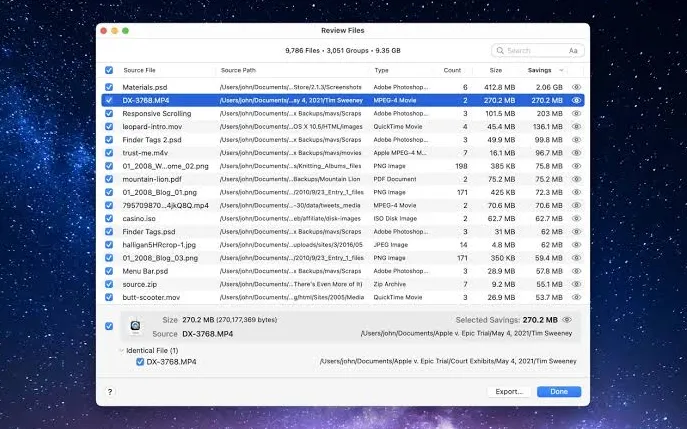
Launch Hyperspace from the Mac App Store, click Choose Folder or drag one or more directories onto the window, and run Scan. The app compares eligible files inside those trees respecting package bundles, cloud-synced folders, and safety filters in Settings and groups identical content into reclaimable families. When the scan finishes, Potential Savings shows how much space you could recover if duplicates were cloned. Paid unlock opens Review Files, where each group lists a designated source file and targets you can exclude before Reclaim Space runs. Click the eye icon or press Space on a selected group to preview a file before you commit.
How do I install and activate?
Launch the downloaded image and drag the application into the Applications folder shortcut.
Once the copying is complete, the application can be launched via Launchpad.
Compatibility
macOS 15 and later