Transfer 2.4.4
Transfer 2.4.4 for Mac
Desktop file server for Mac that allows switches, access points and other gear to pull firmware, or push running-config without needing a Linux box, or Terminal tftpd.
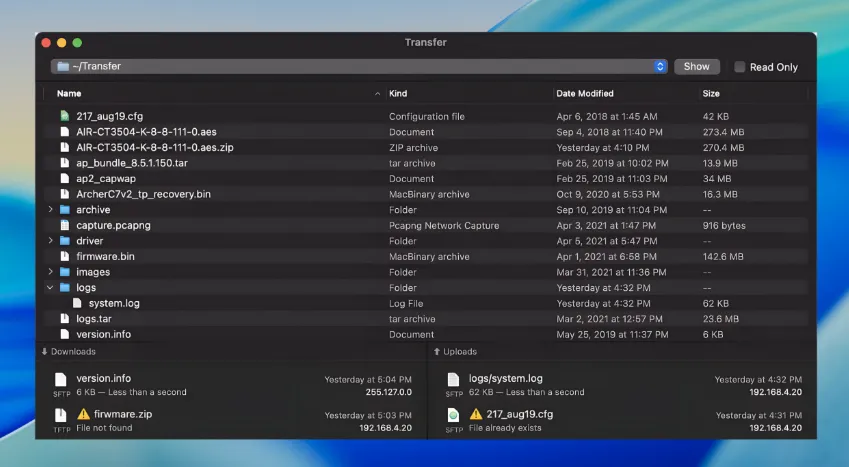
File staging in the root directory
The Mac App Store version asks for a destination when you first launch it. Clients will never see the remainder of the disk. Drag a firmware image, saved configuration, or Finder file into the app browser and it will be ready to read. When devices are only supposed to fetch files, the toolbar allows you to lock the folder as read-only. The path menu can remember the last 10 roots. This is useful if you have separate piles of images for lab, production and vendor. You can preview, rename or delete files while they are still in place. You can also nest folders.
Enabling TFTP with FTP open
This is not a client for file transfer, but a server console. The window shows two lists of active downloads and uploaded files: the filename, the rate, the remaining time when a size is known, as well as client IP and protocol. Jobs that are completed and those that fail remain in the history and can be exported to CSV. When a switch does not start the transfer, the first thing to do is go to View > Show Logs by pressing Command-L.
Listeners for TFTP (SFTP), FTP, HTTP and HTTPS are supported on IPv4 as well as IPv6. FTP, HTTP and HTTPS are disabled by default so that an unauthenticated FTP or web share is not accidentally exposed. For older switches, TFTP over UDP 69 remains the default path. SFTP defaults to TCP 22, and presents a virtual folder named /Transfer even if it’s not the actual root. Scripts that hard code a host path will need this alias. Under Settings > General, you can find the username, password, listening ports, and overwrite behaviour. The TFTP settings include broadcast requests, timeouts, retries, and the options that will be accepted by the server during negotiation (block size and transfer size).
A typical device job and port clashes
Default ports conflict with macOS: the system TFTP Daemon, Apache and leftover File Sharing FTP. Remote Login also owns SFTP. If the port for a protocol is already being used, you can either stop the service that uses it or change Transfer’s listening port. Then click Retry. Allow the app to pass through the firewall. Copy the IP address from the bottom bar and point your device to it. SFTP and FTP have authentication; TFTP does not.
The lab bench is not for public use
Use it if you’re already sitting at a Mac, and need an RFC-aware, short-lived endpoint to pull logs, firmware, backup configurations, or backup configurations. If you want a client to access someone else’s bucket on S3, a scheduled two-way synchronization, or an internet-facing server, skip it. License costs $19.99 USD with a 3-day trial. Time-limited licenses are also available. The floor is macOS 13.5. Version 2.4.4 includes a Spanish interface, and the Help book is replaced by online documentation. This works well on a bench connected to the internet. It’s less convenient if you are in a closet with no Internet connection unless you have cached pages.