OmniPlan Pro 4.11.0
OmniPlan Pro 4.11.0 for Mac
A professional critical-path planner from The Omni Group for turning tasks, calendars, and resource limits into a dated Gantt you can level, baseline, and stress-test.
Outline first, then the timeline
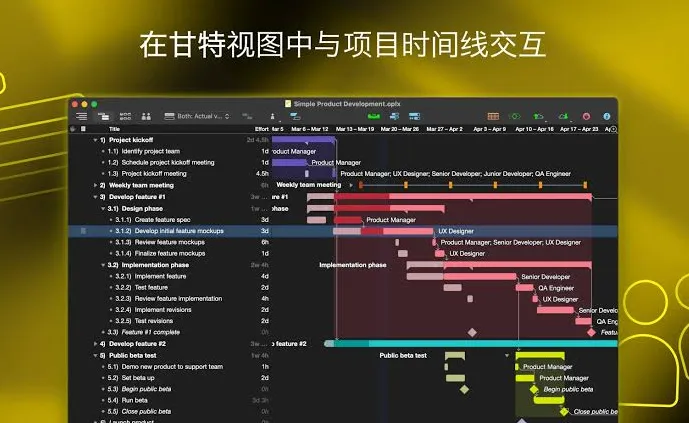
A new file usually starts from the project assistant or a built-in template—Standard Project, Standard Project (Styled), or Simple Project. You enter work in the outline: names, effort or duration, predecessors, and who (or what equipment) is assigned. The Gantt chart and the network diagram stay bound to that outline, so a finish-to-start link or a split task appears on the bar chart without a second drawing tool. Automatic scheduling fills dates from effort and constraints; you can still lock a start or finish when a client date or a plant shutdown forces it.
Pro tools versus the Standard license
Standard already includes Gantt, leveling, dependencies, costs, milestones, hammock and recurring tasks, and violation repair. Pro is the tier that matters if you need Microsoft Project import and export, Monte Carlo runs on duration uncertainty, resource load sharing across files, earned value analysis, change tracking, or a multi-project dashboard. Omni Automation (JavaScript) and AppleScript are Pro-only on Mac. Publishing a plan to a collaboration server is likewise Pro if the team actually publishes instead of mailing files around.
Buying Pro on Omni Store versus the App Store
The Omni Store listed a one-time Pro license at $399.99 (universal across Mac, iPhone, iPad, and Apple Vision Pro, with updates through the 4.x line) and an annual subscription at $199.99 that stays on current Pro. Standard perpetual is $199.99. The Mac App Store sells the same unlocks as in-app purchases. A two-week trial is intended to unlock Pro so you can compare editions. Version 4.11.0 needs macOS 12 or later; the same license also covers iOS/iPadOS 16 and visionOS 2 clients.