Dato 5.8.3
Dato 5.8.3 for Mac
A menu-bar calendar that shows the week, next meetings, and world clocks without opening Calendar.
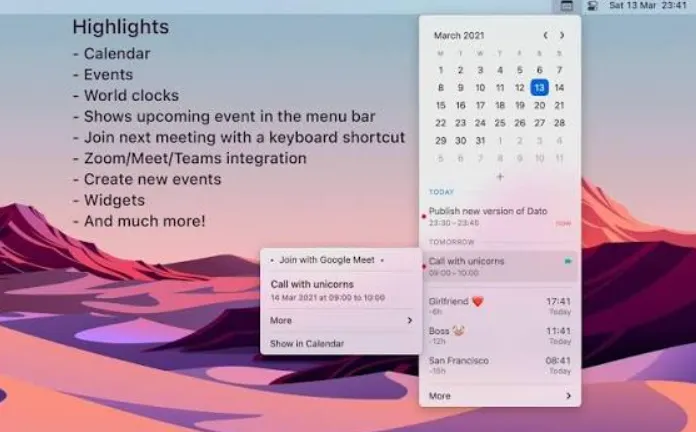
Sindre Sorhus built this as a Mac App Store replacement for the system clock. Click the item and a compact window opens: a month grid with event dots and optional week numbers, a list of the next few days of meetings and reminders, and named time zones searched from an offline list of about 15,000 cities. Date numerals follow the locales macOS already knows. Menus and settings stay English-only, and there is no lunar calendar. Calendars arrive through the system Calendar stack, iCloud, Google, Outlook, or anything else already added there — so Google is not a separate login inside this window.
From the menu bar to the next call
Grant Calendar access on first launch, and Reminders if due items should appear. Many people then thin the built-in clock in Control Center so two times do not fight for space; a crowded menu bar can hide the item entirely. Day to day you click the icon, arrow through days, press Space to jump to today, or long-press a date to open it in Calendar, Fantastical, BusyCal, or Outlook. Press n to start a new event, or j to join the current or next Zoom, Meet, Teams, or other listed video link. Fullscreen meeting alerts can sit on top of whatever you are in, with a join button when a call starts. Time travel on the zone list is for planning, not for changing the Mac clock.
Notification Center versus a dedicated clock
The built-in clock and Notification Center already show the date. This window earns its slot when you want the next event in the menu bar, a join shortcut, or several city clocks without opening Calendar. Skip it if you need natural-language scheduling, Chinese lunar dates, or a localized settings UI. On 5.8.3 the same menu-bar path still applies, and the App Store build needs macOS 26; older Macs use last-compatible downloads on the vendor site. The $18 license is one-time with Family Sharing and promised free upgrades. A site trial is fully usable except for a buy reminder every 12 hours and no automatic updates; Setapp also carries it. Crash diagnostics may be collected and are not linked to your identity.