USB Block for Mac
USB Block for Mac Free Download
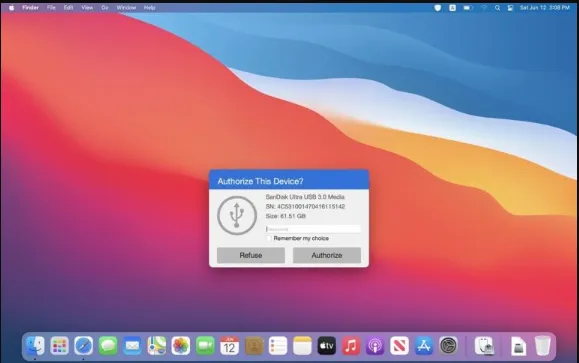
USB Block is the security software that guarantees your protection by preventing data leakage and unauthorized access to your Mac computer. It protects USB passwords with authorization, without a password, non-trusted USB devices are automatically blocked when inserted. It disables USB storage so that no one can access it without a password. USB Block gives you the option to add trusted USB devices to the white list so that you can access them easily. This app prevents network attacks by blocking network access(WLAN) to secure your Mac.
USB Block only allows verified Bluetooth accounts to access and share files and folders with each other. The self-process protection is maintained and none of your confidential information gets hacked. In silent mode, the fans are limited to a certain speed to prevent the CPU from burning out of performance and it never acquires anyone’s attention. You can import and export configuration and apply the configuration to all accounts with 1-click. This app also allows you to record logs and lock apps easily. Taking everything into account, USB Block is the perfect security software that guarantees your protection by preventing data leakage and unauthorized access to your Mac computer.
Features
- Protects USB passwords with authorization
- Allows you to record logs and lock apps easily
- Disables USB storage so that no one can access it without a password
- Prevents data leakage and unauthorized access to your Mac computer
- Prevents network attacks by blocking network access (WLAN) to secure your Mac
- Consumes less space in memory and has no effect on the performance of your Mac
- Without a password, non-trusted USB devices are automatically blocked when inserted
- Option to add trusted USB devices to the whitelist so that you can access them easily
- Allows verified Bluetooth accounts to access and share files and folders with each other
- Import and export configuration and apply the configuration to all accounts with 1-click
- None of your confidential information gets hacked which maintains your self-process protection
- In silent mode, the fans are limited to a certain speed to prevent the CPU from burning out of the performance.
- Available in different languages such as English, French, Japanese, Simplified Chinese, Spanish, and Traditional Chinese
Technical Details
- Mac Software Full Name: USB Block for macOS
- Setup App File Name: USB-Block-2.6.dmg
- Version: 2.6
- File Extension: DMG
- Full Application Size: 5 MB
- Setup Type: Offline Installer / Full Standalone Setup DMG Package
- Compatibility Architecture: Apple-Intel Architecture