Workspaces 2.3
Workspaces 2.3 for Mac
A project-based launcher that groups the apps, files, folders, websites, and automation steps you need for one job, then opens or closes them together instead of hunting through the Dock and Finder.
Building a workspace from real Mac resources
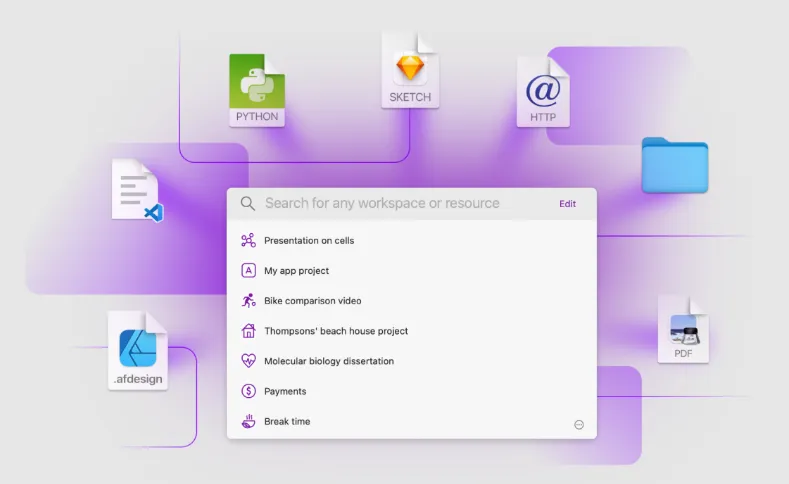
Each workspace is a named project. You drag apps, documents, folders, URLs, Mail messages, Terminal locations, Shortcuts, and plugin actions into one list, then decide which items run on START and which run on FINISH. A freelance writer might keep Scrivener, research PDFs, and three browser tabs in a “Book draft” workspace; a developer might pair Xcode, a repo folder, localhost URLs, and a ScriptRunner shell script. Templates and separators keep long resource lists readable when you repeat the same structure across clients or codebases.
Plugins extend START and FINISH beyond simple open-and-quit. QuitApps closes background apps when you leave a project; ScriptRunner runs shell commands; other official plugins add keystrokes or music playback. Plugins are downloaded separately and installed through Settings, where website and Setapp builds can update them in-app.
Day-to-day launching from the menu bar or Search
Workspaces runs from a menu bar extra while the app is open. Click START to open everything assigned to that workspace, work until you are done, then click FINISH to run cleanup actions. Search finds workspaces and individual resources quickly; you can open a whole workspace or one file from the results. Apple Shortcuts and an AppleScript API let other tools on your Mac trigger the same launches without opening the main window.
The editor also supports per-resource delays, custom file managers and Terminal apps, notes and tasks attached to a workspace, archiving inactive projects, and a Share extension for sending links into a workspace from Safari or other apps. Project data stays on your Mac; Apptorium does not sync workspaces through iCloud and says it collects no usage analytics.
Window layout gaps and purchase options
Workspaces suits anyone who switches between multi-app projects and wants repeatable setup without manual clicking. It will not restore saved window positions or macOS Spaces layouts on its own, so layout-heavy workflows still need Shortcuts or manual arrangement. Compared with a plain Dock folder, the payoff is FINISH automation, searchable resource lists, and plugin-driven teardown.
You can start with a 30-day trial from Apptorium, buy a one-time license with free 2.x updates, install from the Mac App Store, or subscribe through Setapp. Apptorium requires macOS 14 or newer for version 2.3.
How do I install and activate?
Mount the image and run Open Gatekeeper friendly.
Press Enter to bypass Gatekeeper in the Terminal window.
Drag the application to the Applications folder.
The application is ready to use.
Compatibility
macOS 10.14 and later