Keep It 2.8.11
Keep It 2.8.11 for Mac
Everything you collect notes, saved articles, PDFs, and scans lives as real files in one tagged library wired into the Finder and Spotlight.
Building a research library on your Mac
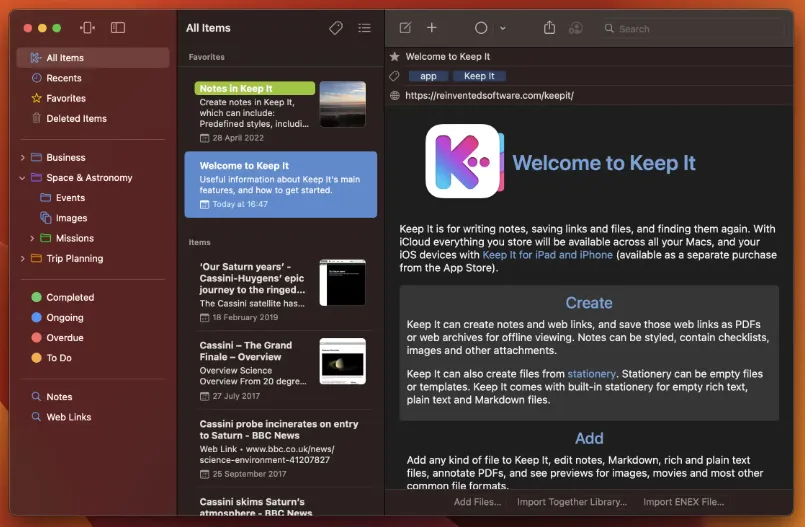
Keep It from Steve Harris and Reinvented Software is the successor to the older Together app. Instead of trapping material inside a proprietary database, it stores each item as files, folders, and Finder tags inside a single library. You can create styled notes with checklists and attachments, save web links as PDFs or minimal offline pages, drop in scans and PDFs, and file mail messages with scripts or Automator workflows. Folders, bundles, color labels, and nested saved searches give you several ways to group the same item without duplicating files.
Finder integration and everyday filing
Version 2 added deep Finder integration, which is the feature that separates Keep It from simpler note apps. Your library appears as a location in Open and Save panels, so other apps can read and write the same files. Quick File and Quick Open provide keyboard-driven filing and navigation when the full window feels heavy. Compact Mode collapses the interface to a single column for split-screen work beside a browser or editor. Drag-and-drop, the Share extension, Services menu, AppleScript, and Shortcuts cover most import paths without forcing you through one dialog.
Search, tags, and iCloud
Search spans names, metadata, note content, highlighted text, checklists, and text recognized in scanned PDFs and images. The Tag Filter drills down by combining tags, and saved searches can live inside the folders they target. iCloud keeps libraries aligned across Macs and optional iPad and iPhone apps, and top-level folders or individual items can be shared with other Keep It users. The vendor states that Dropbox, OneDrive, and iCloud Drive cannot host the library only Keep It’s own iCloud integration is supported.
Purchase paths and who it suits
Keep It is not part of Setapp. On the Mac App Store it is free to download with monthly or yearly subscriptions and a two-week trial; Family Sharing applies, but the iOS app remains a separate purchase. A direct download from Reinvented Software offers a 15-day trial and a one-time license for all 2.x releases on every Mac in your household. macOS 14 Sonoma or later is required the App Store listing currently specifies macOS 14.6+, and the September 2026 Mac download on Reinvented Software’s site is build 2.8.11.
Researchers, writers, and consultants who juggle Notes, bookmarks, and loose Downloads folders usually get more from Keep It than people who only need quick memos or live co-editing in shared workspaces. Multiple separate libraries, Dropbox-based sync, or a subscription bundle are reasons to look elsewhere.
How do I install and activate?
Mount the image and launch Open Gatekeeper Friendly.
Press Enter to bypass Gatekeeper in the Terminal window.
Drag the application to the Applications folder.
WARNING! SIP must be disabled. Learn more >
Compatibility
macOS 11.3 and later