File List Export 3.1
File List Export 3.1 for Mac
Drop a folder in and get a table you can filter, then save as Excel, PDF, or HTML.
Scan a folder, then trim the table
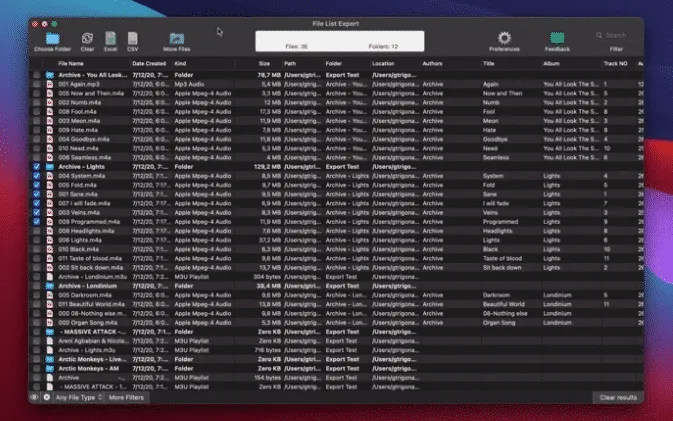
Select a directory or drag files onto the window. Choose whether to walk subfolders. The preview grid fills with names, dates, kinds, sizes, and paths; you can search, sort, and keep only one kind PDFs in Documents, audio in Music, photos for a thumbnail Excel index. Pick columns before you export: a photo job can keep EXIF and GPS, while an IT inventory keeps checksums and paths only. Columns go well beyond Finder’s list view: comments and tags, audio album fields, image dimensions and color profile, video codecs, MD5 and SHA-256, plus photo EXIF including a Maps link. Rename headers if the spreadsheet needs custom labels. When the table looks right, export to .xlsx/.xls (optional thumbnails), CSV, TSV, PDF, HTML, JSON, or Markdown, or copy the grid into Numbers or Sheets.
Version 3.1 adds a content-based duplicate pass on that same scanned tree. Copies that were renamed still group together; a Duplicate Group column sorts, filters, and rides into every export. You can keep the newest file, the oldest, or the one nearest the top of the scan, and send the rest to the Trash one member of each set stays, and the Bin keeps the rest recoverable. Command-P prints the current table the same way the PDF export does. Large folders calculate sizes faster, long lists scroll more smoothly, and the scan footer now shows files done, files left, and a rough time remaining.
When a Terminal listing is enough
Stay in Finder or a plain Terminal listing if you only need names in one folder. Use this when you must hand someone a catalog, an insurance inventory, or a photo index with metadata you do not want to type. It is not a DAM and it is not a two-folder sync tool: it inventories one tree and, in this build, can cull verified duplicates. The App Store listing is “Files List Export”; the product is the same one-time $8.99 Mac utility (Family Sharing) for macOS 11 or later, English only. There is no separate trial on the listing the purchase is the license. Processing stays on the Mac; the developer states no user data is collected.
How do I install and activate?
Mount the image and launch Open Gatekeeper Friendly.
Press Enter to bypass Gatekeeper in the Terminal window.
Drag the application to the Applications folder.
The application is ready to use.
Compatibility
macOS 11 and later