SuperTab 5.1.2 for Mac
SuperTab 5.1.2 for Mac Free Download
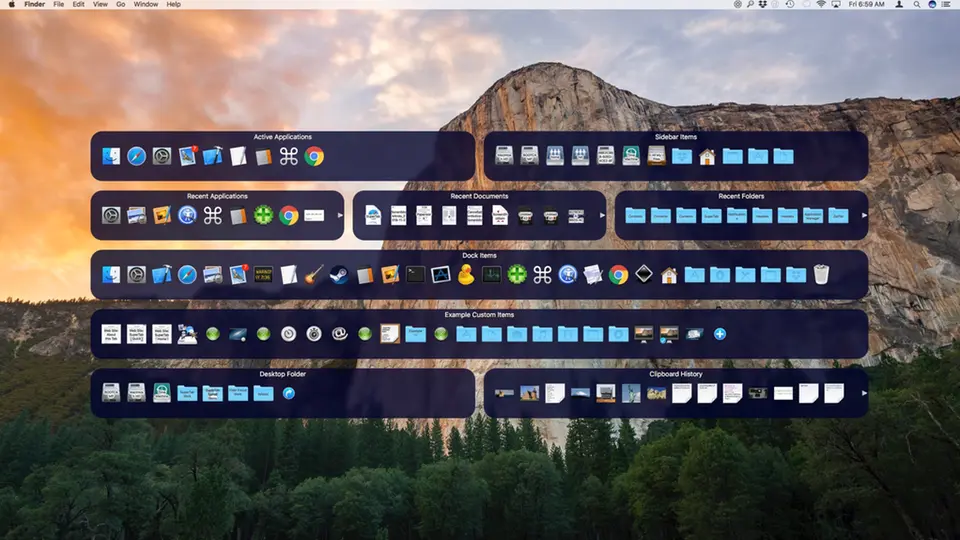
SuperTab extends the Mac’s built-in (Command-Tab) switcher for switching between running applications.
Before SuperTab, only App Switcher gave Mac users access to their currently active apps. With SuperTab installed, users now have access to much more with Command-Tab, such as:
– Active applications and application windows – active applications on the left, all active application windows on the right
– Recent apps, recent documents, and recent folders—items you’ve recently opened.
– Dock Items – All the apps, files, and folders you have in your Dock.
– Custom items – such as websites, screenshots, clipboard, folders, metafolders, etc.
– Desktop contents and clipboard history – your desktop contents on the left, clipboard history on the right
But that’s not all. SuperTab lets you customize the app switcher to suit your work style. You can remove any of the default rows of icons, which we call tab rows, and create additional ones. You can choose from:
– Active applications – your active applications
– Application windows – all windows of all applications in all spaces
– Recent apps – apps you’ve recently opened
– Recent documents – documents that you recently opened.
– Recent folders – folders you have recently accessed.
– Folder contents – the contents of any folder you select.
– Dock Items – Some or all items from your dock.
– Calendar Items – Instantly view your calendar items and their details.
– Clipboard history – the recent contents of your Mac’s clipboard.
– Dropbox Contents – Access your Dropbox and all its contents
– Tagged items – files, folders, and applications with tags or shortcuts you specify.
– Finder Sidebar Items – Items that appear in the “sidebar” of Finder windows.
– Snagit Capture – Instantly view, copy, share, and access your Snagit photos.
– Custom Elements – The Custom Elements tab rows allow you to select their contents. Add any:
– Files, folders and applications
– System settings such as System Notifications, iCloud, Time Machine, etc.
– Multiple clipboards for storing text or image fragments available for instant reuse.
– Bookmark your favorite websites
– Customizable screenshots and one-click access
– Stock quotes to help track your portfolio
– Stopwatches to tell how long something takes without digging out your phone
– Countdown timers so you don’t miss anything important!
– Meta folders for quick access to any group of files, folders or applications of your choice.
– Display configurations to switch to your favorite display configurations with one click.
– Saved Spotlight searches to access Spotlight search results.
– Auto-Types and SuperTab automatically types frequently used phrases for you.
How to install and activate?
Mount the downloaded image and run the Double-Click-Me application
After that, drag the SuperTab application to the Applications folder shortcut.
Once copying is complete, the application can be launched via Launchpad.