Money Pro 2.11.33
Money Pro 2.11.33 for Mac
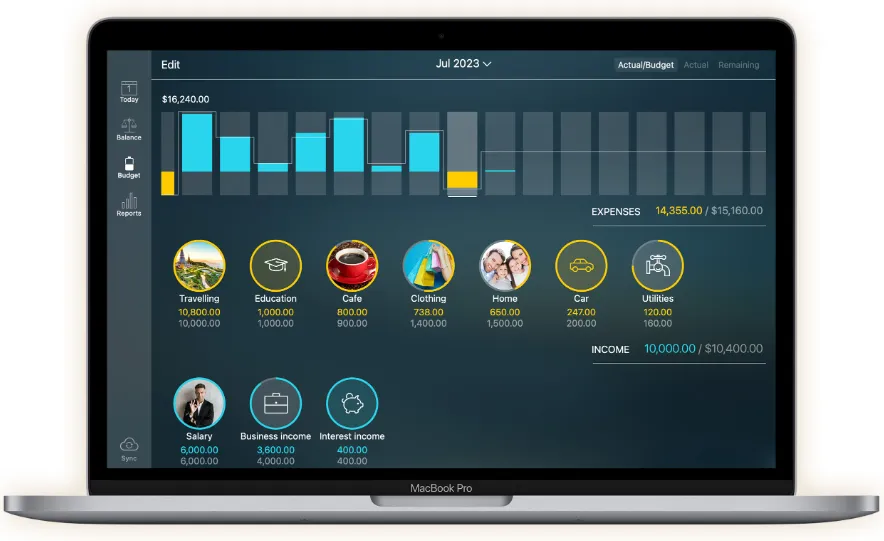
Accounts, recurring bills, and category budgets sit in one Mac window so you can approve today’s charges and see what is left this period.
Register, calendar, and the leftover bar
You start by creating checking, savings, and credit-card accounts, then enter charges with payee, class, check number, and an optional receipt photo. Recurring bills land on a large calendar; the Today list is where you approve or reschedule what is due. Budgets can be income or expense, with different limits per period and an optional rollover that carries leftover or overspend into the next cycle. Split a supermarket trip across groceries and household when one receipt hits several categories. Reconciliation keeps an available balance and a cleared balance so a paper statement can be ticked off without guessing.
OFX import, iCloud, and the paid gates
Bank history can come in as OFX or CSV from the Balance tab without a subscription; the app offers category guesses after you teach it a few payees. Connecting a live bank feed is GOLD. Cross-platform Money Pro Sync (iOS, Android, Windows, family sharing, up to 10 devices and 10 people on a profile) is PLUS or GOLD—the profile owner pays. Apple-only users on the same iCloud account can still use free iCloud sync, per the vendor guide. The Mac app is a separate store purchase from the iPhone/iPad edition.
Monterey floor and why this is still the 2.x app
macOS 12 or later is required. iBear also sells a newer Money Pro 3 line that, per their FAQ, needs an active PLUS or GOLD subscription even if you already bought 2.x; they say 2.x keeps getting maintenance. Version 2.11.33 sits on that 2.x track. This remains a household register and budget, not a brokerage blotter—verify your bank before paying GOLD for a live feed, and keep typing or importing as the reliable path.