Sketch 2026.3.1
Sketch 2026.3.1 for Mac
A Mac-only editor for screens, components, and click-through prototypes, with an optional Workspace so people without a Mac can inspect and comment.
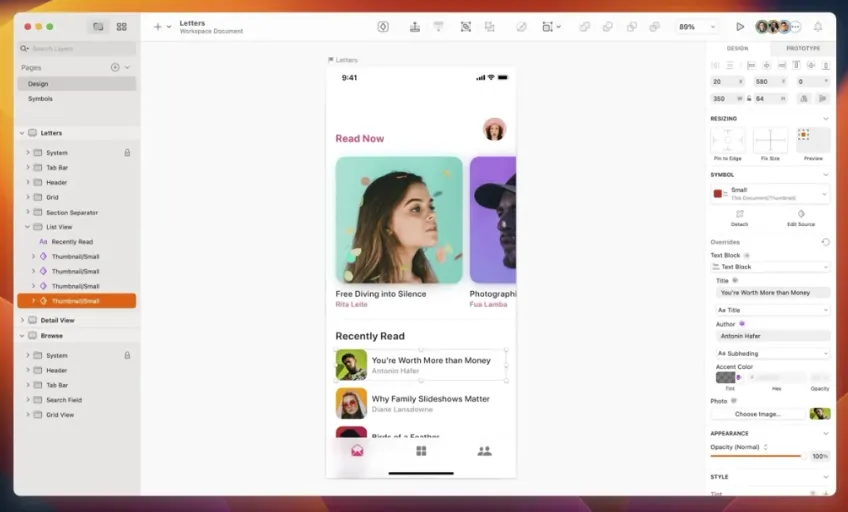
Frames, Stacks, and the Inspector
You create a document, place frames on the Infinite Canvas, and build each screen from vector shapes, text, and images. Everyday layout now sits in Stacks: minimum and maximum sizes, percentage widths so items stay proportional, negative spacing when you want overlap, and a z-index control for stacked children. You can tell a Stack whether borders count in its math. Symbols and Libraries keep buttons, bars, and tokens reusable across files; Variables feed colors and numbers into those instances. The Inspector holds fills, per-side borders, effects, and export settings. Command Bar is the faster way to swap a Symbol or jump to a layer than hunting the Layer List. When a frame must change size without redrawing, the Scale tool now snaps to nearby edges with smart guides.
Where Stacks and effects stop being enough
The Florence feature set in this line added group blurs (layer, motion, zoom), multiple drop shadows on unfilled frames, and glass plus fade on the same layer, with fade respecting existing opacity. That covers a lot of UI chrome. Long-form print and illustration work sit outside the documented product-design scope. The vendor does not support running the Mac app in virtual machines. If the shop is Windows-first and lives in a browser canvas all day, the Mac editor is the wrong seat — the web client is for viewing, not for replacing it.