Bloom 1.5.40
Bloom 1.5.40 for Mac
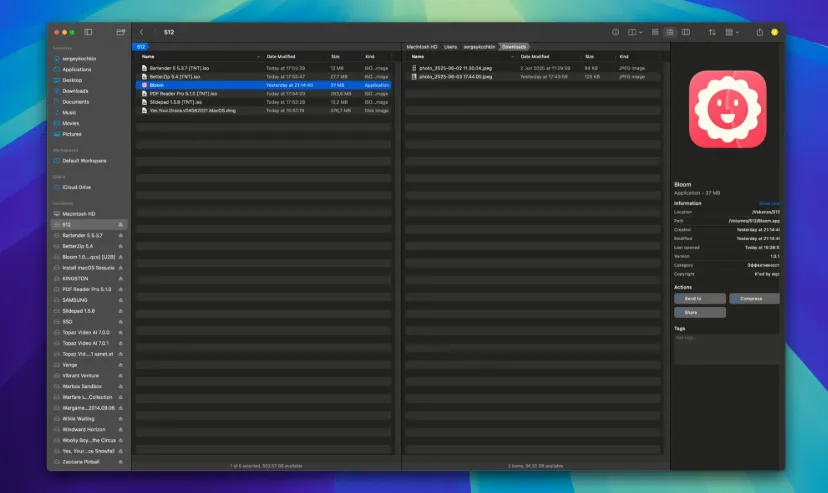
A multi-pane file manager: press ⌘⇧⏎ from almost any app to summon a path panel and live folder search instead of digging through Finder sidebars.
Go-to navigation and scoped search
From the desktop or inside Bloom, ⌘⇧⏎ opens the go-to panel where you type a path, pick a favorite, or run a keyword search across configured roots. Tab inside a Bloom window opens the same panel, so nested folders rarely need repeated sidebar clicks. ⌘F starts live search in the current directory; results refresh as the file system changes, and ⌘R forces a rescan when you want a clean index. The vendor positions keyword search as fast enough for large home-folder trees, which matters when you are hunting assets across project folders rather than browsing one tree at a time.
Pane layouts, Portal, and workspaces
Standard windows support dual- or quad-pane browsing with sync mode: select a folder on one side and its contents appear on the other without extra navigation. Portal mode strips chrome down to a compact floating panel you can pin on top or dock to a screen edge—handy as a drop zone or quick access to a working directory. Workspaces save pane arrangements and can carry custom icons. Column view can widen name columns automatically, and accent themes tint the interface beyond Finder’s default gray chrome.
Inspectors, renames, and cloud folders
Advanced rename covers add, replace, insert, and regex batches when cleaning downloads or photo sets. List View can surface metadata such as Date Last Opened and Duration when filename sorting alone is not enough context. Enhanced Text Preview can show formatted text inside the inspector, with a setting to skip the content-type check when that preview misreads a file. Tags can be edited from a panel popover, though reading all system tags typically requires granting Full Disk Access under Privacy & Security. iCloud Drive, Dropbox, and OneDrive folders browse with a native feel; FTP servers can mount for browsing but file operations on those remote paths remain unsupported in current builds.
Paywall, permissions, and Finder handoff
The vendor sells a one-time $16 license with a seven-day trial and free updates; the user guide documents a three-Mac activation limit with deactivate steps when you change hardware. macOS 14.0 or later is required on Apple Silicon or Intel when installing version 1.5.40. Bloom is not a system-level Finder replacement—Reveal-in-Finder defaults still need manual setup if you want Bloom as the primary reveal target. Heavy keyboard users who manage sync folders, project trees, and batch renames daily get the most from the pane layouts and Footprints undo log; occasional file openers may prefer staying in Finder unless the global go-to shortcut alone justifies the purchase.