Wise Menu 2 for Macos
Wise Menu 2 for Macos Free Download
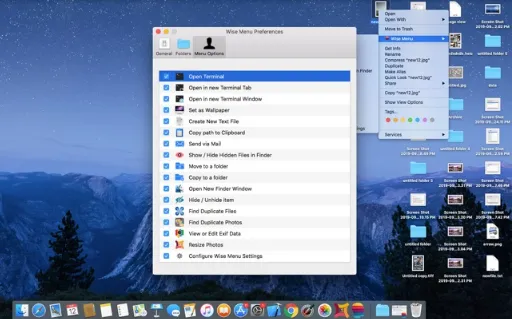
Wise Menu is a competent and efficient piece of software designed that adds powerful action items to the context menu which appears on right-click. This powerful application adds useful actions to the context menu locates in Finder. It is a very lightweight program with self-explaining tools and options to enhance the workflow. The software offers additional menu items that make it quick and super easy to do certain things which are not available by default.
With the help of Wise Menu, you can instantly create a new document in the desired folder, copying or moving files or folders from one location to another. It allows you to open terminal windows with the current finder folder, file and others. The application lets you open a new Terminal tab in an open Terminal window and change the directory accordingly. Another glorious feature, it copies the entire file path of the selected file to your clipboard. Lastly, it allows you to show and hide hidden files in Finder.
Features
- A superb application that assists you to improve your productivity
- Allows you to move files and folders on your Mac with great ease
- Offers a professional-looking interface that makes it easy to use
- Requires only one click to copy a whole folder to another location
- Allows you to save time by getting quick actions done smoothly
- Enables user to show and hide hidden folders and files in Finder
Technical Details
- Mac Software Full Name: Wise Menu 2.1 for macOS
- Setup App File Name: Wise-Menu-2.1.dmg
- Full Application Size: 7.35 MB
- Setup Type: Offline Installer / Full Standalone Setup DMG Package
- Compatibility Architecture: Apple-Intel Architecture