Taphouse Pro 1.5.8.1
Taphouse Pro 1.5.8.1 for Mac
Browse, update, and clean Homebrew packages from a list instead of memorizing brew flags.
Click a cask instead of typing brew upgrade
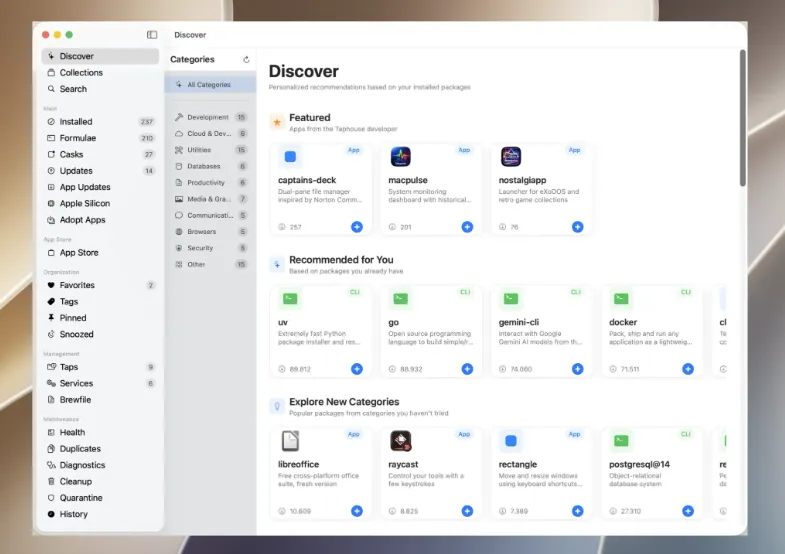
Homebrew has to be installed first. Then download Taphouse from the vendor DMG or install the taphouse cask. The window lists formulae and casks, outdated rows, services, disk use, and a CVE scan against public feeds. Select one package or a batch and install, upgrade, or uninstall with a progress sheet. Discover can browse the catalog by category; you can still drop back to the command line mid-task. Caveats that used to hide in install logs show in the detail pane.
Tags from the list, names from Finder
Version 1.5.8.1 (12 Sep 2026) is mainly about how the list reads: you can tag packages from a right-click, and the Apple Silicon screen uses the same names as Applications so Intel leftovers are easier to spot and swap. Brewfile export and Open App follow the same “show the real app” idea after a Homebrew change that had broken the preview.
Sonoma floor and what it still needs
Official floor is macOS 14 on Apple Silicon and Intel. Taphouse talks to Homebrew, GitHub for notes, and CVE feeds; there is no vendor login. Some actions need administrator rights or App Management before quarantine or helper tools finish. Touch ID for sudo is a Pro setting that keeps the password in Keychain only while enabled. The raw brew CLI is still enough if you only ever upgrade one formula. This is for people who want a list, a CVE badge, and a restore point before a bulk upgrade.