Infuse 8 PRO 8.5.3
Infuse 8 PRO 8.5.3 for Mac
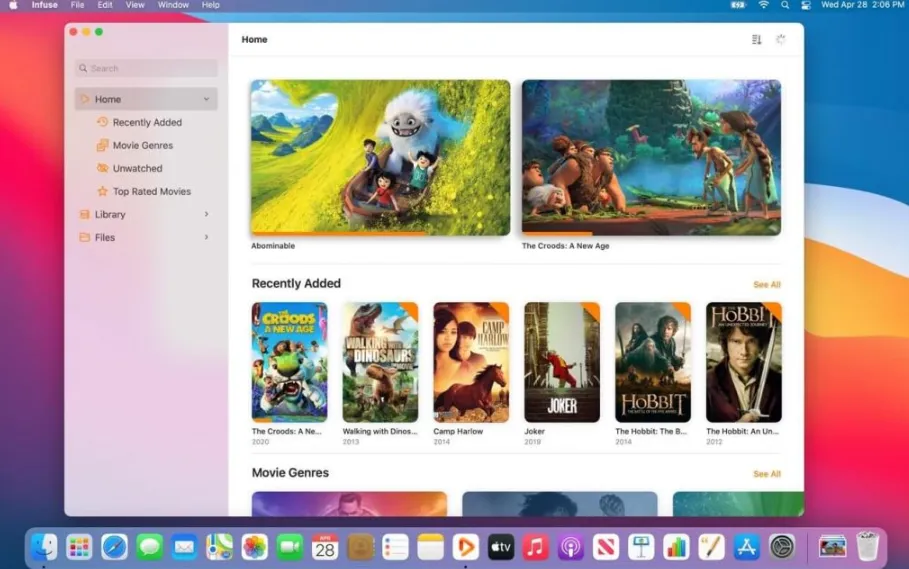
Firecore’s Pro tier turns scattered video folders into a curated home-theater library on Mac, with network shares, media servers, and optional cloud sources feeding a single browse-and-play shell.
From folders to a browsable shelf
You point Infuse at local storage, an SMB or NFS share, FTP, WebDAV, or a Plex, Jellyfin, or Emby library. The app indexes titles, pulls TMDB posters, cast, ratings, and episode art, and groups movies and series into filters you can search by genre, resolution, or watched state. Pin favorites, build collections, and resume from Continue Watching without manually renaming files or maintaining sidecar XML.
Adding shares and waiting for the scan
Setup usually means opening Settings, adding a source, entering credentials for your NAS or server, and letting Infuse crawl new paths in the background. Large libraries can take a while before every poster appears, but playback often works while indexing continues. When artwork looks stale, you can refresh metadata for a single title instead of rebuilding the whole database.
Playback that skips the transcode queue
Unlike forcing everything through iTunes-compatible MP4, Infuse’s engine plays MKV, ISO, BDMV, and many less common containers with hardware decoding on Apple Silicon or Intel Macs. When hardware and displays allow, Pro unlocks Dolby Vision profiles and Dolby Atmos passthrough, plus AirPlay and Google Cast with subtitles. OpenSubtitles integration adds text tracks in a tap; Trakt scrobbling keeps ratings and progress aligned across devices.
Choosing Infuse over a plain player
VLC and IINA excel when you double-click one file and want zero setup. Infuse makes more sense when your media lives on a NAS, spans multiple codecs, or already sits inside Plex, Jellyfin, or Emby, because the value is the shelf experience not a minimal transport bar. Parental rating filters and custom collections also matter more in shared households than in a solo download folder.