System Dashboard Pro 3.1.5 for Mac
System Dashboard Pro 3.1.5 for Mac Free Download
System Dashboard Pro is a Mac utility from developer Sascha Simon. It is the expanded follow-up to his older System Dashboard app: same idea of watching how hard your Mac is working, but with more panels and detail on current macOS versions.
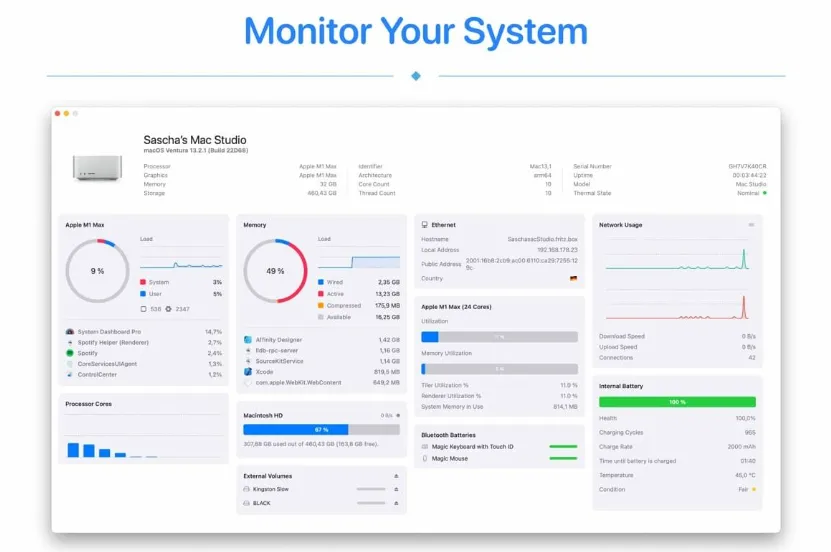
When something feels slow a fan spinning up, Safari stuttering, or a download that never finishes you usually open Activity Monitor and jump between tabs. System Dashboard Pro puts the common checks in one place. You see macOS version and machine info at a glance, then panels for processor load (current and recent history plus top processes), memory the same way, network addresses and live up/down speeds with open connection counts, and disk space plus transfer speed on internal drives.
The app is small (about 3 MB on the store listing), English-only in the store metadata, and priced at $2.99 with Family Sharing. It needs macOS 15.6 or later, which is a fairly new floor check compatibility before installing on older Macs. Version 3.1.5 is a stability update with bug fixes rather than a feature-heavy release; if you already use the free System Dashboard, Pro is the richer dashboard Simon rebuilt for Apple Silicon–era systems.
How do I install and activate?
Mount the image and launch Open Gatekeeper Friendly.
Press Enter to bypass Gatekeeper in the Terminal window.
Drag the application to the Applications folder.
The application is ready to use.