Shortery 8.2 for Mac
Shortery 8.2 for Mac Free Download
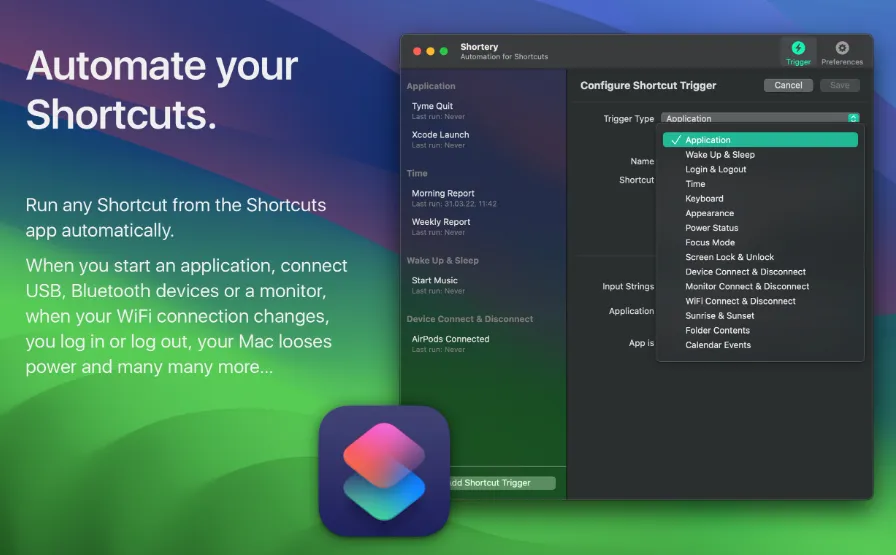
Tired of manually executing a Shortcut every morning when starting to work? Just add the Shortcut to Shortery and let it run automatically.
Features
Application — Run a shortcut when you start or quit an app or when the app becomes active / inactive.
Devices — Run a shortcut when you connect or disconnect any USB, Bluetooth device or your headphones.
Folders — Observe any folder on your Mac and run a shortcut, when the contents change.
Focus Mode — Trigger a shortcut when a focus mode on your Mac changes.
Monitors — Trigger a shortcut, when you connect or disconnect a monitor.
WiFi — Run a shortcut when your WiFi connection changes.
Time — Set a time when the Shortcut should run and define how often it should be repeated.
Wake Up & Sleep — Run Shortcuts before your Mac goes to sleep or after it wakes up.
Login & Logout — How about your Mac greeting you in the morning and telling you about your current day? Use the Login-Trigger to get your day started.
Keyboard — Need direct access to a Shortcut? Define a global hotkey and trigger it from any app.
Appearance — Run a Shortcut when your Mac changes from dark to light mode or light to dark mode.
Power — Run a Shortcut when you plug in a power adapter or your battery capacity runs low.
Screen — Triggers a shortcut, when you lock or unlock your screen.
Sunrise & Sunset — Run shortcuts when the sun sets or rises based on your current location.
Compatibility: macOS 13 and later