RightFont 10.1.1 for Mac
RightFont 10.1.1 for Mac Free Download
A native macOS font manager that lets designers browse large libraries, preview typefaces without permanent installation, and activate missing fonts directly inside creative apps.
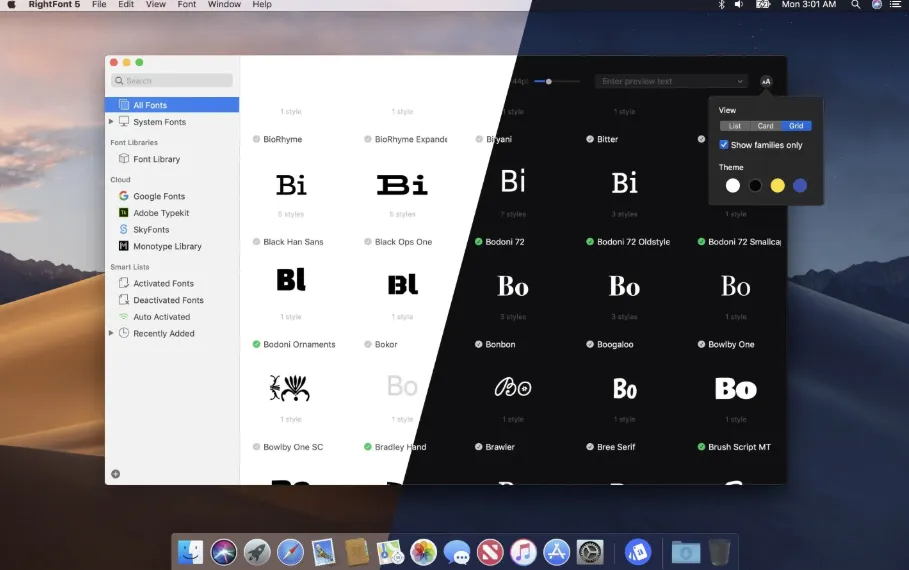
RightFont keeps local folders, Google Fonts, Adobe Fonts, and team libraries in one workspace with Unified Search, tags, smart filters, and font sets. Grid, list, and waterfall views support custom preview text, OpenType feature inspection, glyph browsing, and nested tags introduced in the 10.0 rebuild. Fonts activate on demand rather than copying everything into the system folder, which helps large collections stay manageable.
Integration covers missing-font auto-activation in Adobe Creative Cloud (through 2026), Affinity 3, Sketch, Figma, QuarkXPress, Microsoft Office, and Apple iWork apps. Select text in a supported host app and use Apply Font to switch families in one click; RightFont activates the font in the background if needed. Libraries can sync through Dropbox or Google Drive for team sharing.
How do I install and activate?
Mount the image and launch Open Gatekeeper Friendly.
Press Enter to bypass Gatekeeper in the Terminal window.
Drag the application to the Applications folder.
The application is ready to use.