Permute 4.0.5 for Mac
Permute 4.0.5 for Mac Free Download
A native macOS media converter from Charlie Monroe Software that turns drag-and-drop queues into transcoded video, audio, images, PDFs, and text files without opening a separate FFmpeg terminal workflow.
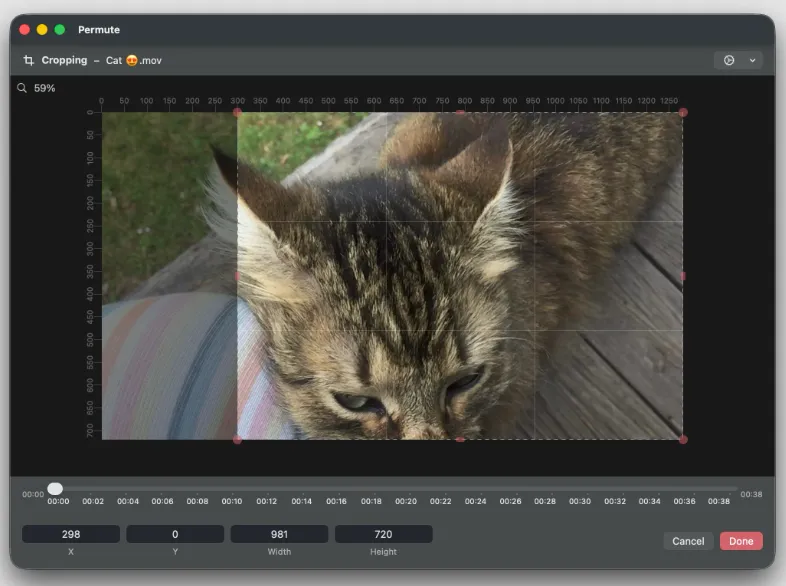
You drop files onto the queue, pick a preset such as MP4, HEVC, ProRes, WebM, AV1, MP3, FLAC, HEIC, or WebP, and start conversion. The 4.0 interface shows thumbnails in the queue, lets you trim audio with a waveform view, crop video or images with pixel rulers, and adjust speed, volume, subtitles, and audio tracks before export. Batch groups handle many files at once; drop zones can auto-run a preset when new files land in a folder.
Beyond simple format swaps, Permute 4 merges or splits media, extracts tracks, burns or replaces subtitles, runs OCR on images, generates text-to-speech audio, builds slideshow videos, exports video frames, and converts PDF pages to images. An Advanced Custom preset exposes raw FFmpeg commands for power users, while hardware-accelerated HEVC, MP4, and ProRes paths aim to use Apple Silicon efficiently. Metadata editing, HLS stream output, IP-camera file repair, and options to trash or move originals after conversion round out professional-style tasks in a single app.
How do I install and activate?
Run the downloaded image and drag the application to the Applications folder shortcut.
Once the copy is complete, you can launch the application from Launchpad.
Compatibility
macOS 10.14.6 and later