Octavo 1.0.4 for Mac
Octavo 1.0.4 for Mac Free Download
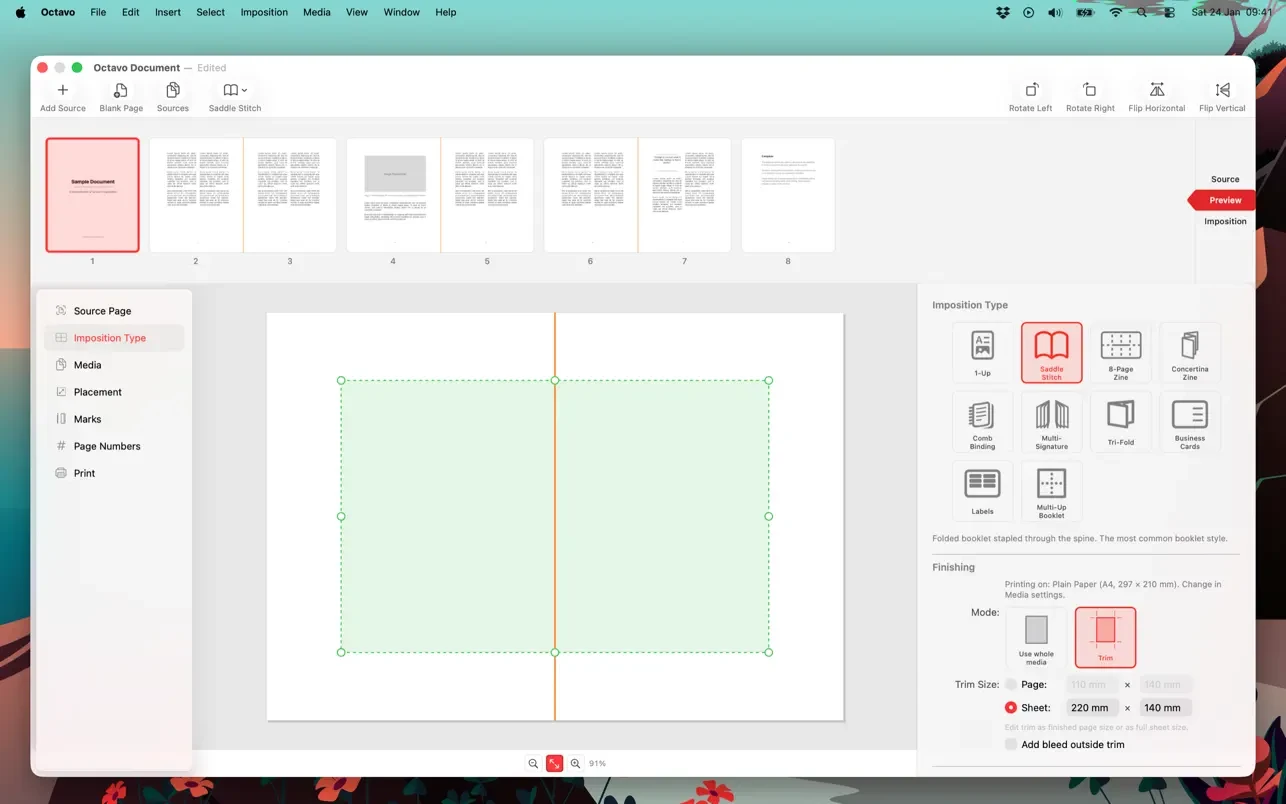
Octavo is an app that transforms the process of creating booklets, brochures, mini-zines, and business cards from a page-calculating puzzle into a simple and straightforward task. Simply upload a PDF file, and Octavo automatically calculates the page order for double-sided printing, adds fold and staple marks, and prepares the sheets for printing.
If you’ve ever tried to print a booklet and weren’t sure how to arrange the pages, or spent a battle with the printer settings, ruining half a ream of paper, Octavo is for you. The app was born from a real-life problem the developer encountered: after updating their laser printer, they discovered that the “booklet printing” option was missing from the new driver.
Peculiarities:
• Booklet creation made easy.
Create booklets with staples and automatic page ordering. Simply upload a PDF file, and Octavo will automatically calculate the layout.
• Single Sheet Mini Zines
Fold a single sheet of paper into an 8-page self-published or accordion-style zine. Perfect for handouts, art projects, and quick publications.
• Business cards and labels
Lay out business cards or labels on standard-sized sheets of paper. Arrange the rows, columns, and spaces according to the paper type.
• Eliminate clutter in your PDFs.
Correct page size mismatches, align distorted scans, and precisely position pages. You can even apply filters for monochrome, sharpening, and noise reduction.
• Live Preview
See exactly how your assembled pages will look before printing. Adjust settings and watch the layout update in real time.
• Printer’s Marks and Page Numbers
Add crop, fold, and registration marks. If desired, number pages for ease of assembly.
• Manage your printer
Adjust duplex printing settings, view non-printable margins, and manage trays and paper supplies.