Internet Status 5.9 for Mac
Internet Status 5.9 for Mac Free Download
Internet Status (listed on the Mac App Store as iON: Internet Status) is a small menu bar utility from AppYogi Software that shows whether your Mac actually has working internet not just whether Wi‑Fi is connected.
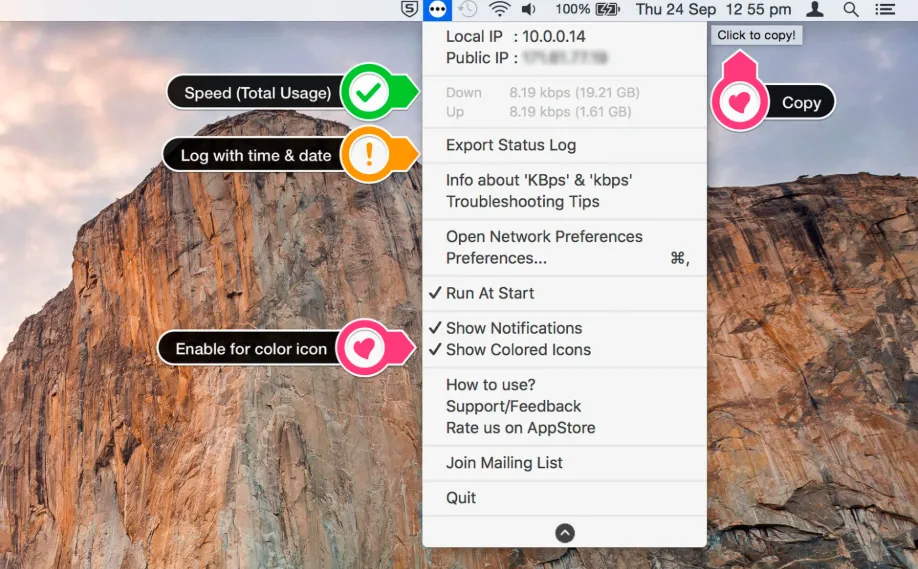
After launch, the app lives in the menu bar with a green, yellow, or red icon. Green means an active internet connection; yellow means the Mac is on a network but without usable internet; red means no connection. Click the icon to see your public and local IP, current upload and download speeds, the Wi‑Fi network name, and session data usage since the Mac started.
That is useful when video calls drop, downloads stall, or you are not sure if the problem is your router, VPN, or the Mac itself. You can copy your public IP with one click, turn on notifications when connectivity changes, pick custom alert sounds, and export a text log of connection events with timestamps for troubleshooting or sharing with support.
Requirements
Internet Status runs on macOS 10.11 or later and works on Intel and Apple Silicon Macs. You can launch it at login, switch between colored and monochrome menu bar icons, and choose from several icon styles. The App Store build costs $0.99 and supports Family Sharing; AppYogi also sells a direct download with a trial from their site. Data usage counters reset after a reboot, which the developer documents in the store listing.
Version 5.9 is a recent maintenance update; the App Store notes mention bug fixes and performance improvements rather than new features. Support contact on the listing: [email protected].
How do I install and activate?
Mount the image and launch Open Gatekeeper Friendly.
Press Enter to bypass Gatekeeper in the Terminal window.
Drag the application to the Applications folder.
The application is ready to use.