gSyncing 1.1.73
gSyncing 1.1.73 Download
If you have a Google account you certainly know its benefits. Google services are available by default on mobile devices like Android, iOS or Windows Phone smartphones and tablets and on desktop platforms like PC or MAC via browsers. Your contacts and calendars are automatically synchronized between all devices. However, neither Google nor Microsoft provide a service to sync your data with your favorite email client – Microsoft Outlook. gSyncing allows you to synchronize your Outlook contacts, calendars, and tasks with your Google account and other supported services like smartphones and tablets running on iOS, Android, Windows Phone, etc.
Would you like to combine and use functions of both services? Would not it be nice to have a GMail Outlook sync app or to sync Google contacts with Outlook? Sync Outlook with Google and take the maximum comfort of them. For example, sync Outlook calendar with Google calendar. You can easily use Gmail account while you are travelling, and then continue using Outlook on your desktop PC. Syncing of Google contacts with Outlook helps you access and manage contacts on any device.
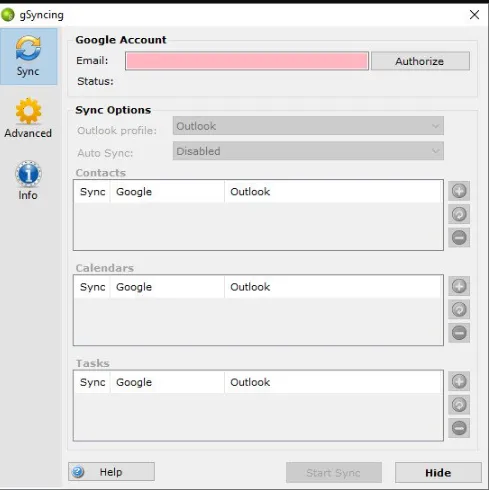
Features
gSyncing supports Outlook 2019, 2016, 2013, 2010 (32- and 64-bit), 2007, 2003.
– Compatible with Windows 10, 8, 7, Vista, XP (32- and 64-bit).
– Easy to use interface.
– Using of arbitrary Outlook profiles and Google accounts.
– One- and two-way syncing of arbitrary selected contacts, calendars, and tasks folders.
– Multi-user support allows you to use shared Google calendars and contacts in a team.
– Synchronization of multiple calenders is possible.
– Automatically sync items on a regular time interval.
– Automatically detect duplicate items when syncing.
– Date filter for calendar entries in Outlook.
– Timezone support of events in Outlook and in Google calendars
– Sync options to control how and what you want to sync.
– gSyncing is fully compliant with the new Google API platform and is therefore future safe.