FastFlix 6.1
FastFlix 6.1 Download
FastFlix is a simple and friendly GUI for encoding videos. FastFlix keeps HDR10 metadata for x265, NVEncC HEVC, and VCEEncC HEVC, which will also be expanded to AV1 libraries when available. It needs FFmpeg (version 4.3 or greater) under the hood for the heavy lifting, and can work with a variety of encoders.
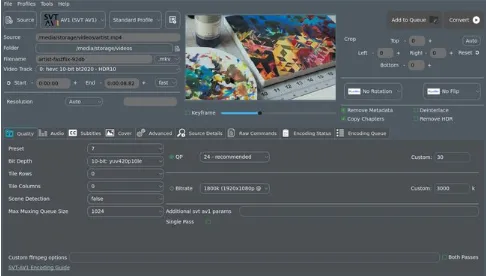
Supports a plethora of video file formats
Aiming to meet the requirements and needs of all potential users, FastFlix comes in two editions: an installer-based one and a portable one. The application features a user-friendly GUI that bundles all the configuration options and tools needed to encode videos. There are few settings in the upper menus, since all the tools you need are mostly located in the tab-based layout.
The first thing you need to do is select the input video. FastFlix provides support for various formats, including MP4, MKV, MOV, M4V, AVI, DIVX, WebM, MPG, MP2, MPEG, OGG, MOV, M4P, FLV, and many more. HEVC and YUV videos are also amongst the compatible formats.
Use presets, create profiles and get extra control over video encoding
Choosing the output format is possible via a simple drop-down menu in the main window. FastFlix can generate encoded videos in MKV, MP4, TS, MOV, AVI, MTS, M2TS and M4V format.
Thanks to the built-in video player, you can preview the clip frame by frame. The lower side of the window comprises options to manage the output quality, audio streams, subtitles, covers, as well as additional raw commands that can be executed.