
Auth Ally 2.5.2
Auth Ally 2.5.2 for Mac
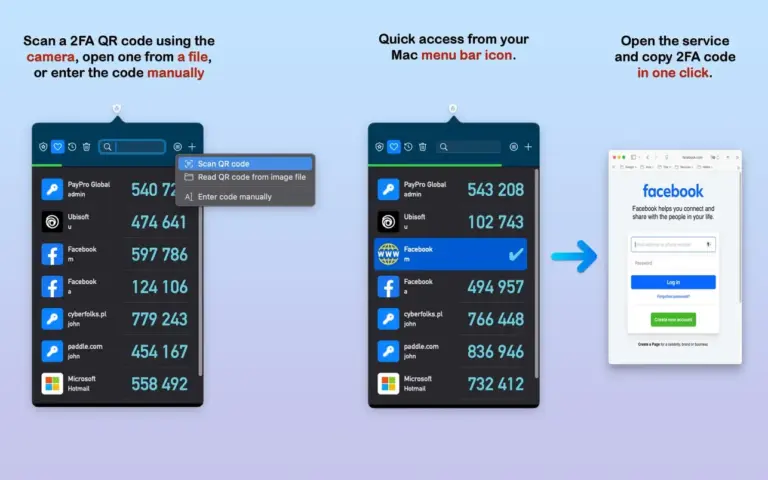
Auth Ally for Mac is an authentication app made for Mac users. It helps you get security codes when you sign in to websites and online services that use two-step verification. Instead of checking your phone whenever you need a security code, you can keep your codes on your Mac. Auth Ally runs from the Mac menu bar, so you can quickly open it and find the code you need.
The app is useful for people who manage many online accounts. It can be helpful for security users, developers, network users, and anyone who uses two-step verification on a regular basis. Auth Ally can also create security codes without an internet connection. This makes it useful when your Mac is offline or when you do not have a stable connection.
Auth Ally for Mac has a simple purpose. It makes two-step verification easier to use on a Mac. After you add an account, the app creates a new security code when you need to sign in. The code changes regularly, so you can use it during the login process. One of the best things about Auth Ally is its menu bar design. You do not need to open a large application window every time you need a code. You can simply click the Auth Ally icon and access your accounts.
Features
- Designed specifically for Mac users
- Creates security codes for two-step verification
- Works without an internet connection
- Runs directly from the Mac menu bar
- Provides quick access to saved accounts
- Supports QR code account setup
- Protects stored information with a main password
- Supports encrypted backups
- Supports iCloud synchronization
- Lets you organize your accounts
- Includes favorites and recently used accounts
Technical Details
- Software Name: Auth Ally MacOS
- Software File Name: Auth Ally v2.5.2.dmg
- Version: 2.5.2
- File Size: 7 MB
- File Extension: DMG
- License Type: Premium