BoltAI 2.16.0
BoltAI 2.16.0 for Mac
Bring the API keys you already pay for , OpenAI, Anthropic, Gemini, or a local Ollama server into one Dock window instead of a new browser tab per model.
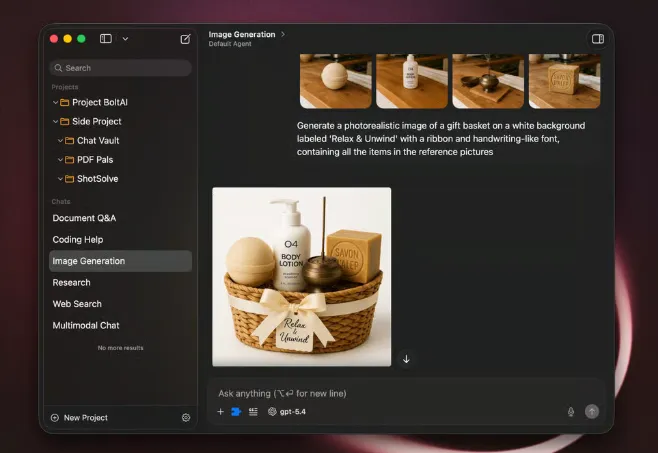
Daniel Nguyen’s SwiftUI client is not a ChatGPT wrapper with bundled tokens. You add OpenAI, Anthropic, Gemini, Mistral, Azure, Bedrock, OpenRouter, or a ChatGPT/Claude subscription through Codex CLI or Claude Code, and you can also point at Ollama or LM Studio on the same machine. Chats live in a local SQLite store by default. Requests go to the provider you picked; the vendor says it does not train on that traffic. API keys can sit behind a passphrase. Optional Cloud Sync encrypts data in transit and at rest if you want the same projects on iPhone and iPad.
Add a key, then stay in the same thread
First run is a settings pass, not a credit store. You paste a provider key or point the app at a local server, then open a chat and pick the model from the switcher. Temperature, max tokens, and top-p stay on that conversation, so a drafting thread and a code-review thread do not share the same sliders. Reusable prompts, forked threads, and a prompt library keep the long work in one project instead of a pile of untitled browser tabs. When you need tools, licensed seats can attach MCP servers and run code from the same window. CLI providers (Codex, Claude Code, Gemini CLI, GitHub Copilot) sit beside the HTTP APIs if that is how you already pay for a subscription.
Shortcut, screenshot, then the long thread
A global shortcut opens Instant Chat over whatever you were in, so a selected paragraph can go out without bringing the full window forward. ShotSolve sends a screenshot for an explanation. Dictation and inline edit keep the hands on the current document. The full window is for projects, document Q&A, and agents that you reuse. The trial can stream replies and search existing chats, but Instant Chat, ShotSolve, agents, and most multimodal tools stay locked until you buy.
Browser ChatGPT versus a local console
The website already chats. This window earns a Dock slot when you switch models mid-task, keep history searchable, or refuse a second AI subscription just for credits. Skip it if you only want bundled tokens and no keys to manage. Essential is $79 for one desktop; Pro is $99 for two desktops plus one mobile; Pro+ is $199 for three desktops plus two mobile, each with a 30-day refund. The license is perpetual with one year of updates; Cloud Sync and new builds pause if you do not renew (renewal is optional, typically 40% off individuals). Cloud Sync quota is 512 MB on Essential, 1 GB on Pro, and 5 GB on Pro+. Team seats start at $99 when you buy five or more. Students and educators can ask for 50% off, then stack the usual renewal discount. On 2.16.0 you still need macOS 13 or later on Intel or Apple Silicon, and you still pay the model vendors separately. Windows is listed as coming soon.