Comic Life 4.2.1 for Mac
Comic Life 4.2.1 for Mac Free Download
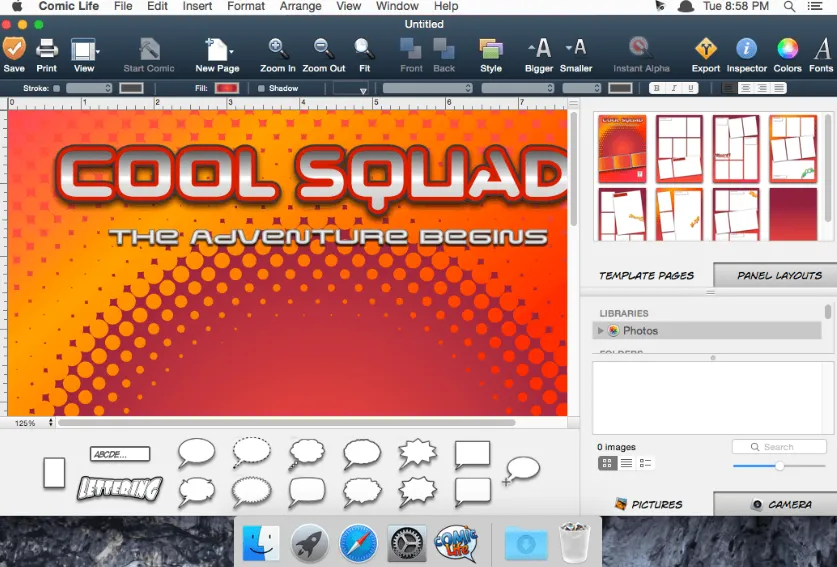
Comic Life is a Mac desktop publishing app from plasq that turns your photos into comic pages, classroom projects, or short visual stories not a comic reader for following other people’s feeds.
You open a template or a blank page, drop in pictures from the built-in photo browser, and add speech balloons, captions, and lettering. Comic Life 4 adds stronger photo styling than older versions: comic filters you can tune in an image panel, Instant Alpha for cutting subjects out of backgrounds, and shape tools to build custom panels and balloon outlines. A script editor lets you write dialogue first, then drag lines onto the page so layout stays organized on longer stories.
Balloons support multiple tails, burst and stroke tail styles, and an envelop action that wraps speech around text. Captions can use decorative initial caps or connect in threads across a page. Lettering includes line mode along a path (useful for sound effects), multiline titles, and 3D styling for classic comic headlines. When the page looks right, you export to PDF, EPUB, CBZ, or images, or print through AirPrint.
How do I install and activate?
Mount the image and launch Open Gatekeeper Friendly.
Press Enter to bypass Gatekeeper in the Terminal window.
Drag the application to the Applications folder.
The application is ready to use.