WiFi Signal Strength Explorer 2.4 For Mac
WiFi Signal Strength Explorer 2.4 Free Download
WiFi Signal Strength Explorer is a handy program that scan, monitor & connect the strongest WiFi signal, if a weak signal, position the WiFi router or move closer. It offers a user-friendly interface and even your cat can use it. The program monitors real-time WiFi signal strength and displays the same percentage with the connected network name in the menu bar.
It adds network name, signal strength with “neat icon”, “percentage” or “dots” on the menu bar. It enables you to auto-connect, strongest Wifi signal available. Moreover, it also provides complete details of other available networks around.
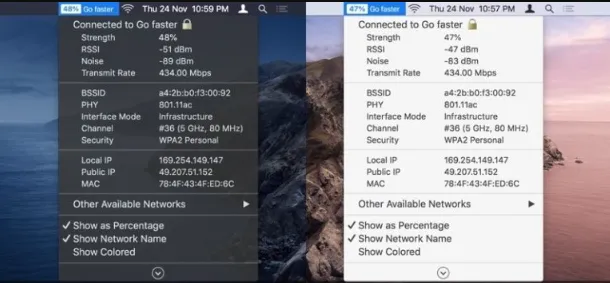
Features
- A handy app that scans, monitors & connects the strongest WiFi signal
- Gives you control to get the public and local IP address
- Connected wireless network name(optional)
- Copy IP, Mac address from the menu
- Set refresh rate of signal strength to scan wifi
- Auto-connect to the strongest signal available
- Transmit rate of a connected Wifi network
- Colour code indication for easy sight
- Customizable menu bar info displays
What Wifi Signal Strength Explorer Offers?
- Work Efficiency: Maintain a reliable network for seamless work tasks.
- Network Diagnostics: Diagnose and resolve network issues with precision.
- User-friendly Interface: Enjoy a straightforward and intuitive user experience.
- Real-time Monitoring: Keep track of your network’s performance as you use it.
- Performance Monitoring: Continuously monitor your network’s performance.
- Integration with Mac OS: Seamlessly integrates with your Mac’s operating system.
- Troubleshooting: Identify and address network problems quickly and effectively.
- Optimization for Gaming: Ensure a stable and fast connection for online gaming.
- Graphing Capabilities: Visualize historical data to diagnose recurring network issues.