
Quantumult X 1.8.0
Quantumult X 1.8.0 for Mac
Quantumult X is an advanced network tool designed mainly for Apple’s mobile platforms. It is known for giving users detailed control over internet connections, proxy settings, DNS requests, traffic rules, and selected network requests. The first thing Mac users should understand is that Quantumult X is not a typical Mac VPN application. The name “Quantumult X for Mac” is often used by third-party download websites, but that does not mean those websites are offering an official native macOS version.
Quantumult X is most useful for people who want more control than a normal VPN provides. Instead of sending all internet traffic through one connection, its rules can determine how different websites or services should connect. For example, a user can configure one service to connect directly while sending another through a proxy. Specific websites or network requests can also be blocked when matching rules are available.
This makes Quantumult X interesting for networking enthusiasts, developers, and users who understand how proxy connections work. It can also be overwhelming for someone who simply wants to press a button and connect to a VPN.
Another important point is that Quantumult X does not automatically provide a private internet connection by itself. The privacy and security of a setup depend on the proxy or VPN service being used, the connection method, DNS settings, and the rules that have been configured.
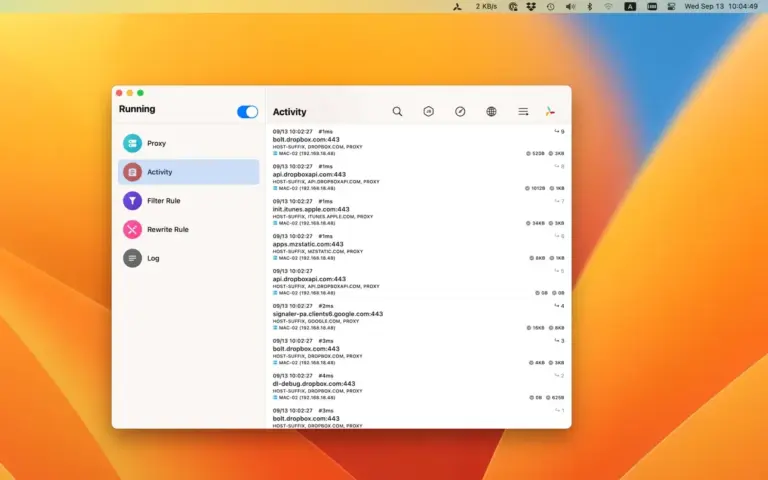
Features
- Advanced traffic rules: Allows users to decide how different websites and services should connect.
- Proxy support: Can work with supported proxy services and configurations.
- Direct connections: Selected traffic can be allowed to connect without going through a proxy.
- Traffic blocking: Rules can be used to block selected domains and network requests.
- DNS control: Provides options for managing how domain names are resolved.
- Request modification: Supported rewrite functions can change selected network requests according to configured rules.
- Custom configurations: Users can create or import configurations instead of relying only on default settings.
- Remote rule resources: Configurations can use externally maintained rule lists and other resources.
- Split routing: Different websites or services can be sent through different connection methods.
- Detailed network control: Gives experienced users considerably more control than a basic VPN application.
- Apple ecosystem support: Quantumult X is primarily associated with iPhone and iPad, so Mac users should verify current official compatibility before installing it.
- Ad and tracker filtering: Properly configured rules can block some advertising and tracking connections.
- Multiple connection methods: Supported connection types depend on the current version and configuration.
- Configuration-based operation: Most of its advanced functionality comes from how the user builds or imports network rules.
- Useful for technical users: Its detailed controls make it more suitable for networking enthusiasts and experienced users than complete beginners.
Technical Details
- Software Name: Quantumult X MacOS
- Software File Name: Quantumult X 1.8.dmg
- Version: 1.8
- File Size: 23 MB
- File Extension: DMG
- License Type: Premium