
Octavo 1.2.3
Octavo 1.2.3 for Mac
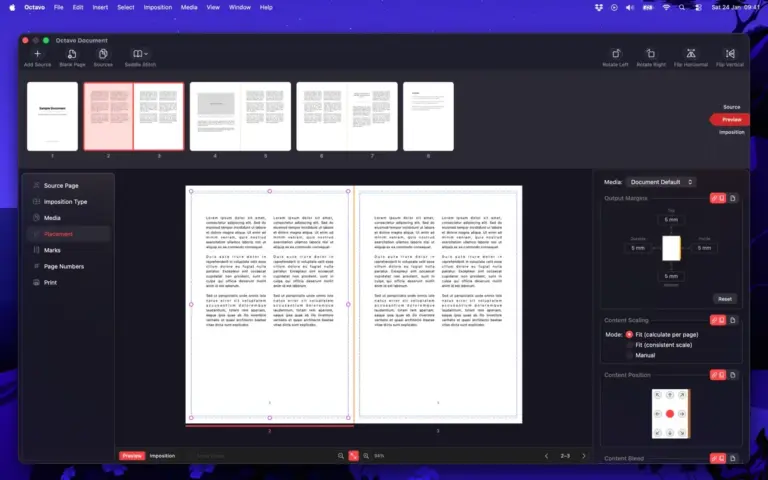
Octavo is a specialized macOS application for PDF imposition and physical document preparation. It takes an existing PDF or image-based document and prepares its pages for printing, folding, cutting, stapling, punching, or binding. Octavo has a clear purpose, and that is one of its biggest advantages.
Instead of trying to do everything, the app focuses on the part of printing that can become confusing. For example, imagine you have a 32-page PDF and want to print it as a small booklet. You can’t simply print pages 1, 2, 3, 4 in that order and expect the finished booklet to work. The pages have to be rearranged on each sheet. After printing, the sheets are folded and placed together, which puts the pages back into normal reading order.
Octavo handles this automatically. You simply import your PDF and select the type of booklet you want to make. The app can also add blank pages when the number of pages doesn’t work correctly for the selected booklet format. This makes it useful for people who don’t want to manually work out which pages should appear together.
Features
- Print folded and stapled booklets
- Create multi-part booklets
- Create tri-fold brochures
- Print business cards
- Print labels
- Create 8-page mini zines
- Create accordion-style zines
- Print pages individually
- Import PDF files
- Import images
- Rearrange pages
- Remove pages
- Add blank pages
- Rotate pages
- Flip pages
Technical Details
- Software Name: Octavo MacOS
- Software File Name: Octavo 1.2.3.dmg
- Version: 1.2.3
- File Size: 12 MB
- File Extension: DMG
- License Type: Premium
- Developer: Double & Thrice