Mole 1.14.0
Mole 1.14.0 for Mac
Scans caches, leftovers, and a disk map, then waits for your review before anything is removed.
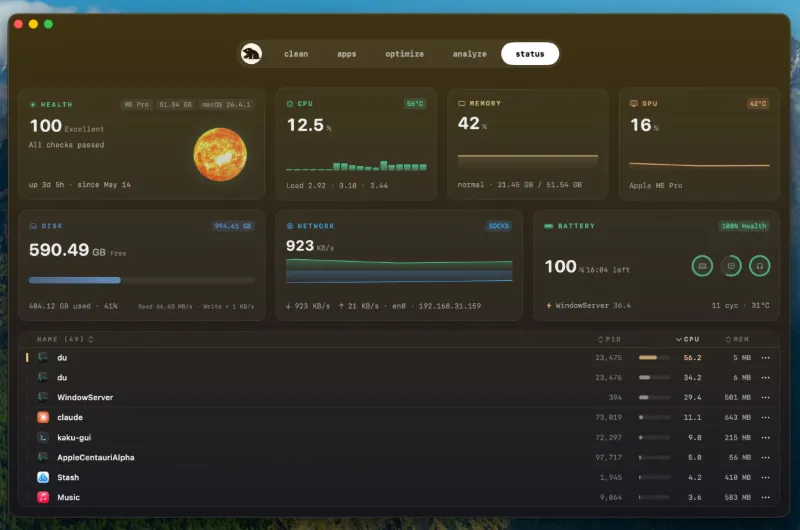
This is the paid native SwiftUI app from mole.fit, not the free open-source CLI that shares the name. Five tabs sit in one window: Clean (Earth) for caches and logs, Software (Mars) for updates, startup items, and uninstall leftovers, Optimize (Mercury) for named maintenance tasks, Analyze (Jupiter) for a treemap of the disk, and Status (Sun) for live CPU, memory, battery, and fans. Scans stay on the Mac; license checks still go out to the vendor. Full Disk Access is needed for a complete scan; without it, protected folders stay incomplete rather than silently empty.
Earth, Mars, and the review list
Open Clean and wait for the scan. Results are grouped by impact: regenerable caches first, user-visible state later, Trash last. Hard-link aware sizing means a shared cache is not counted twice. Package caches that cost a real rebuild stay unchecked. Caches are deleted permanently by default; Settings can route that path through Trash. Software is the other daily tab: one list for Mac App Store, Sparkle, Electron, and Homebrew updates, plus leftover scan across Library folders, Dock icons, and login items. Browser personal data and other ambiguous leftovers stay visible but unselected until you tick them. Optimize runs a short visible fix pass, then deeper tasks only when they are needed, and skips a job with a reason if Mail is open or memory pressure is already healthy.
Status in the menu bar, Analyze on the map
Status is a live dashboard, not a one-shot report. The optional menu bar can show metrics, a compact icon, or a small runner that follows load, plus camera and microphone use, Keep Screen On, and a plain Clean Screen for wiping the display. Analyze draws a treemap you can drill into; right-click moves a folder to Trash after confirmation. Protected roots such as /, /Users, and /Applications cannot be trashed from the map. Scanning and reviewing stay free. Each paid tool — Clean, Software uninstall, Optimize, and moving items to Trash in Analyze — works twice, then a license is required. That is not a two-day trial.
Storage settings versus a dedicated pass
macOS Storage already lists large apps and can empty caches in a blunt way. Reach for this window when you want leftover files after an uninstall, Homebrew and Sparkle updates in the same list as the App Store, or a menu-bar read of temperature and fans without a separate monitor. Skip it if you need antivirus: it is not a malware scanner. Cache cleanup is not file recovery. The vendor asks for macOS 14 or later on Apple Silicon and Intel, a $19 one-time license for two Macs with lifetime updates and a 14-day refund, and no Mac App Store listing. On 1.14.0 the daily path is still the same: scan, tick the rows you accept, then let Clean or Software finish the job.