CapCut Pro 9.3
CapCut Pro 9.3 for Mac
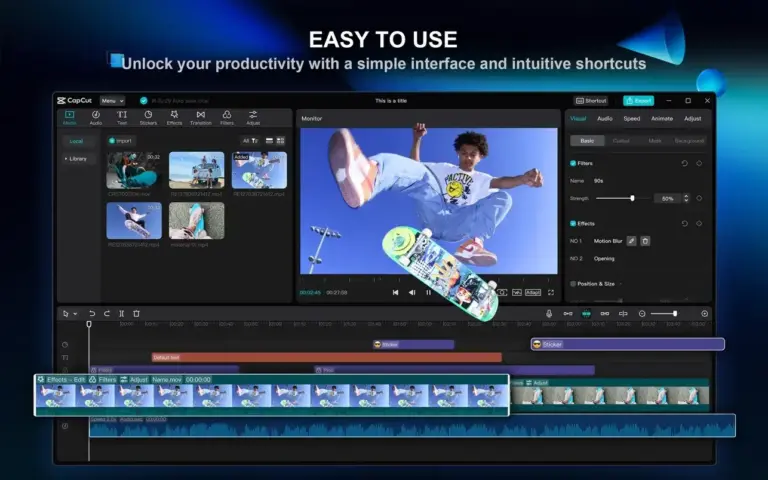
CapCut Pro for Mac is a video editing program for Mac computers. The Mac version is useful for people who have been editing videos on their phones and want a larger screen and a more comfortable editing setup. You can arrange your clips, cut unwanted parts, add text, use music, create captions, add effects, and export the finished video from one place.
CapCut is especially popular with people who make YouTube videos, Shorts, TikTok videos, Instagram Reels, advertisements, tutorials, and other online content. The free version already provides many basic editing tools. CapCut Pro gives users access to additional paid features, effects, templates, and other content. The exact features can change with updates and may also be different in some countries.
Features
- Desktop video editing for macOS
- Timeline-based editing
- Video trimming, splitting, and rearranging
- Multiple video and audio layers
- Text and animated titles
- Automatic captioning
- Transitions and visual effects
- Filters and image adjustments
- Speed controls and video effects
- Music and sound-effect tools
- AI-assisted editing features
- Background removal tools
- Ready-made templates
- Premium effects and creative assets with Pro
- Creator-focused workflow for short-form videos
- Support for high-resolution video workflows
- Keyboard and mouse-based desktop editing
- Export tools for publishing finished videos
- Cross-device workflow options through the CapCut ecosystem
- Tools aimed at YouTube, TikTok, Instagram, and other social platforms
Technical Details
- Software Name: CapCut Pro MacOS
- Software File Name: CapCut Pro 9.3.dmg
- Version: 9.3
- File Size: 1.2 GB
- File Extension: DMG
- License Type: Premium
- Developer: ByteDance