Audiofile Engineering Fidelia 2.7.1 for Mac
Audiofile Engineering Fidelia 2.7.1 for Mac Free Download
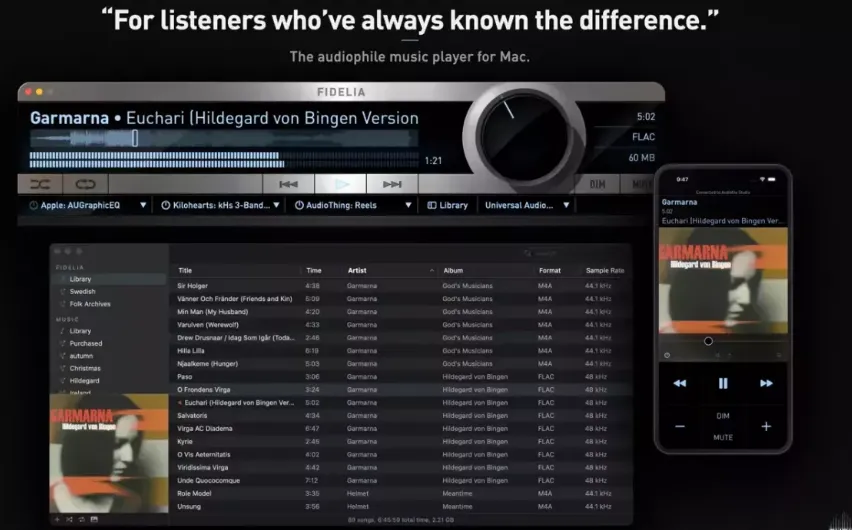
A Mac audiophile music player from Audiofile Engineering for listeners who keep owned files on disk and want explicit control over the path from library to DAC, rather than algorithmic streaming recommendations.
You import or sync a local library of FLAC, ALAC, WAV, AIFF, DSD, APE, and other supported formats, then browse albums on a cover-art wall or detailed list that shows format, sample rate, and bit depth. Playback can run bit-perfect with exclusive output that bypasses the macOS mixer, or through built-in mastering-style DSP such as HeadSpace headphone crossfeed, reference sample-rate conversion, and psychoacoustic dither before audio reaches your interface.
Three Audio Unit effect slots let you load EQ, reverb, metering, or other AU plugins in the listening chain; plugins run out-of-process so a crashing effect does not take down playback, according to the developer. Batch artwork lookup, Music.app library sync, gapless playback, format conversion, multi-channel routing, and customizable keyboard shortcuts target large ripped collections. The free Fidelia Remote app on iPhone or iPad controls transport and volume over the local network.
How do I install and activate?
Open the downloaded image and drag the app to the Applications folder shortcut.
Wait for the copy to complete and launch the app from the Launchpad.
Compatibility
macOS 14 and later