Cap Screen Recorder 0.4.84
Cap Screen Recorder 0.4.84 for Mac
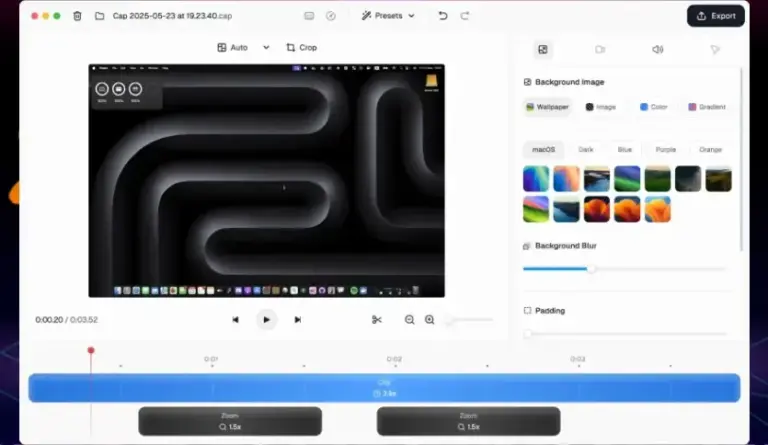
The main thing that stands out about Cap is how little you need to learn before you can start recording. There are no unnecessary controls getting in the way when all you want is to capture your screen. This makes Cap a good choice for everyday screen recording.
For example, if an app isn’t working correctly, you can record the steps that cause the problem. Instead of sending several screenshots and explaining everything in a long message, you can simply show what happens on your Mac. It is also useful for tutorials. You can record yourself using an application and explain each step as you go. This can be helpful when teaching someone how to use new software.
Cap can also work well for work-related tasks. You might need to explain a website change to a client, show a colleague how to complete a task, or record a quick presentation. A short screen recording can often explain these things more clearly than a written message. Another reason some users may prefer Cap is its open-source nature. People who like having more transparency around the software they use may appreciate this approach.
Features
- Screen Recording: Record activity on your Mac screen for tutorials, demonstrations, and explanations.
- Simple Interface: The basic recording process is easy to understand.
- Open Source: Cap has an open-source project, which may appeal to users who prefer this type of software.
- Microphone Recording: You can use your microphone when making recordings where voice explanation is needed.
- Tutorials: Record the steps involved in using an application or website.
- Bug Reports: Show exactly what happens when an application or website has a problem.
- Work Communication: Send short recordings instead of writing long explanations.
- Product Demonstrations: Show how software or an online service works.
- Mac Support: Designed for use on macOS.
- Simple Sharing: Useful for people who regularly create screen recordings to share with others.
- Suitable for Beginners: You don’t need advanced video-recording knowledge to get started.
- Good for Short Videos: Works particularly well when you need to explain something quickly.
Technical Details
- Software Name: Cap Screen Recorder MacOS
- Software File Name: Cap Screen Recorder 0.4.84.dmg
- Version: 0.4.84
- File Size: 107 MB
- File Extension: DMG
- License Type: Premium