Wipr 2 2.38
Wipr 2 2.38 for Mac
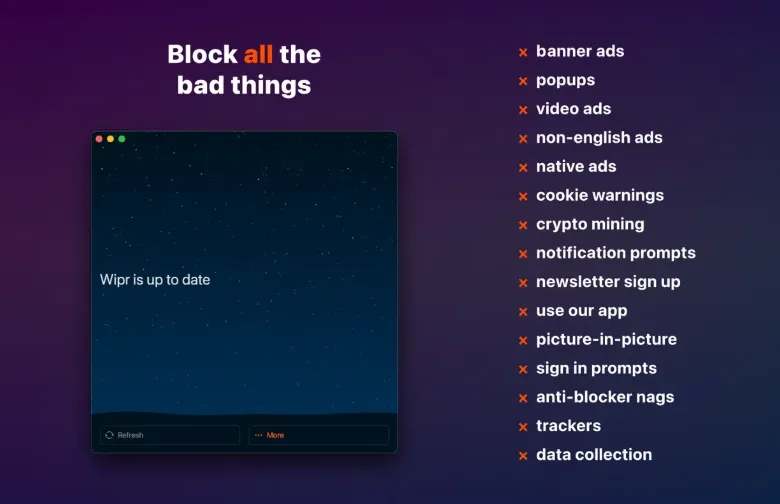
A Safari content blocker that hides ads, popups, trackers, cookie warnings, and other annoyances so pages load cleaner and stop quietly following you around.
Turn on the extensions, then browse
Install from the Mac App Store, open the small status window, and enable the Safari content-blocker extensions in Safari Settings. Once those switches are on, the blocklist runs in the background and updates about twice a week. The window states in one sentence whether the list is current or something is misconfigured, then offers live Help Topics and step-by-step diagnostics instead of a buried FAQ. Broken pages can be sent from Safari’s Share menu with a short description; you choose whether to include an email address. Language-enhanced lists cover dozens of locales, from German and Japanese to Spanish and Vietnamese, while the app itself remains English.
Extra in Safari, Filtr in other apps
The static list is only half of the job. Wipr Extra rewrites or strips page pieces before they become cookie walls, video overlays, or scripts that detect a blocker. That work is Safari-specific. Filtr, a separate in-app purchase, uses macOS 26 URL Filters to refuse listed domains system-wide without seeing your traffic. It is not a VPN and can sit beside a VPN, iCloud Private Relay, or custom DNS. The developer still recommends Safari for browsing, because Extra’s visual hiding does not apply inside Chrome-class apps, and first-party ads inside some Google or Meta apps cannot be split cleanly from the rest of the app.
What you pay, and where it stops
The universal purchase is 4.99 US dollars, Family Sharing included, covering iPhone, iPad, Mac, and Vision Pro. Optional one-time and recurring tips exist. The US store lists two Filtr prices, 4.99 and 24.99 dollars; coverage of those SKUs treats them as yearly versus lifetime. macOS 14 or later is required; Filtr needs 26. There is no upgrade discount from Wipr 1. Version 2.38 tightens Extra on many websites, improves issue reporting, and adds compatibility with iOS 27 and iPadOS 27 on the same purchase. Custom filter syntax and a Chrome-first workflow are outside the product; Safari-daily users who want a paid app with no acceptable-ads program are the intended audience.