AltTab Pro 11.6.1
AltTab Pro 11.6.1 for Mac
Replaces macOS app-only Command-Tab with a switcher that lists individual windows—including minimized, hidden, and on other Spaces—with live previews when Screen Recording is allowed.
Invoking the switcher day to day
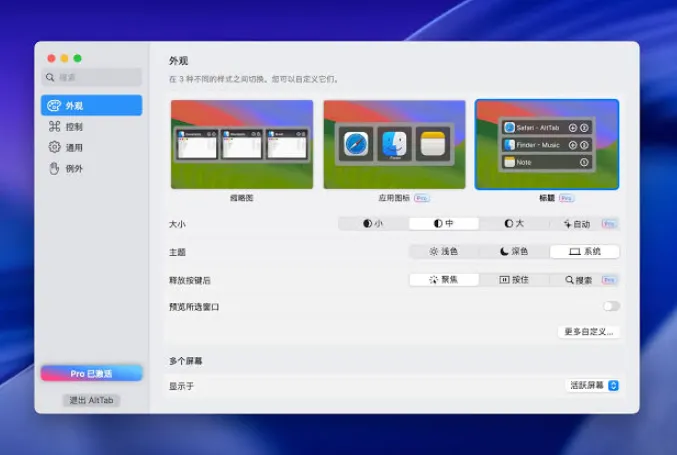
After install, the app lives in the menu bar and listens for a keyboard shortcut. The default is Option-Tab, which mirrors Windows muscle memory without stealing the system Command-Tab app switcher unless you deliberately remap it in preferences. Hold the modifier and tap Tab to move the highlight; release to focus the chosen window. Thumbnail mode shows live previews; Pro unlocks App Icons and Titles layouts when you want a dock-like row or a compact text list instead of screenshots.
Permissions macOS asks for once
First launch walks you through Privacy & Security. Accessibility is required so global shortcuts can focus other apps’ windows. Screen Recording is required for thumbnails and accurate window titles; without it, the vendor documents a degraded mode with limited labeling, though many users grant recording because previews are the core value. The app is distributed from the vendor site and GitHub (Homebrew cask alt-tab), not as a Mac App Store sandbox build.
Free core vs Pro unlock
AltTab Pro is the product brand on alt-tab.app; the same codebase is free and open source on GitHub (lwouis/alt-tab-macos). Thumbnail switching, dark mode, live preview, window controls, and trackpad gestures stay in the free tier. Pro is a one-time $9.99 purchase (or $24.99 Lifetime) with no subscription: search, auto-sizing thumbnails, App Icons and Titles styles, and up to nine independent shortcuts. It is not offered on Setapp in official pricing materials. Licenses cover three devices with a 30-day refund policy.