Wallspace 1.5.1
Wallspace 1.5.1 for Mac
A live-wallpaper player that loops an MP4 on the desktop and can pause when the battery is low.
Pick a clip, then apply per display
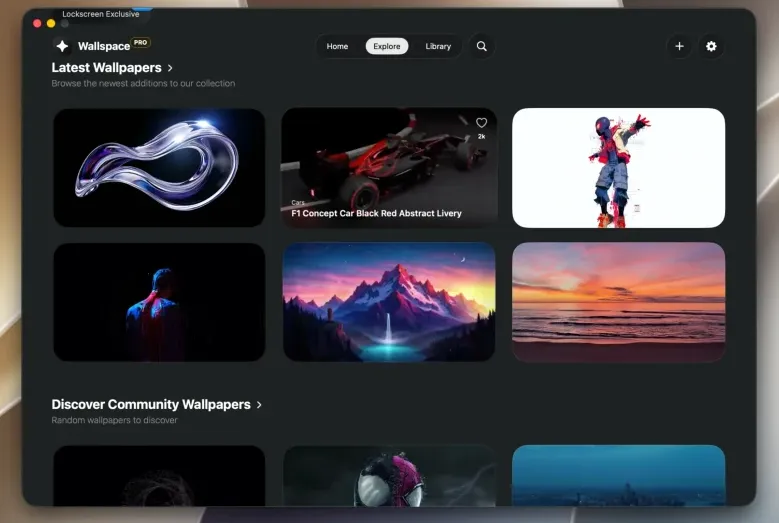
Download from the site or Homebrew, open the gallery, and apply a clip to one monitor or all of them. The apply picker can target the desktop, the lock screen, or both. Own MP4s drop in without a convert step; the vendor says sound is stripped on custom uploads so the desktop stays silent. Playlists can rotate clips. The menu bar can play, pause, reapply, and (in this build) change speed. A free install browses the catalog and sets desktop motion; Wallspace Pro is a $12.99 one-time unlock for unlimited downloads, 4K, lock-screen motion, and community features, with a five-day refund. Lock-screen live wallpapers need macOS 26 or later; the app itself needs 15.
Version 1.5.1 moves Settings into its own floating window with General, Playback, Displays, Storage, Community, License, and Support. You can hide the menu-bar icon, pick 0.5×–1.5× playback (it applies live), and turn Low Power Mode pause and the 20% battery pause on or off separately. Cache can clear on a schedule instead of only by hand. The lock-screen chip now explains why it is disabled Pro, or a Settings toggle rather than sitting mute.
When a still desktop is enough
Stay with System Settings wallpapers if you do not want a video decoder running behind Finder. Use this when you want motion on Sequoia or later without an account, Electron shell, or monthly fee. The vendor claims under 2% CPU and auto-pause during heavy work; treat that as their target, not a guarantee on a 5K display looping 4K. There is no macOS 14 install path. Processing of local files stays on the Mac; catalog downloads still need the network.
How do I install and activate?
Run the downloaded image and drag the application to the Applications folder shortcut.
Once the copy is complete, you can launch the application from Launchpad.
Compatibility
macOS 15 and later