DirEqual 7.7.2
DirEqual 7.7.2 for Mac
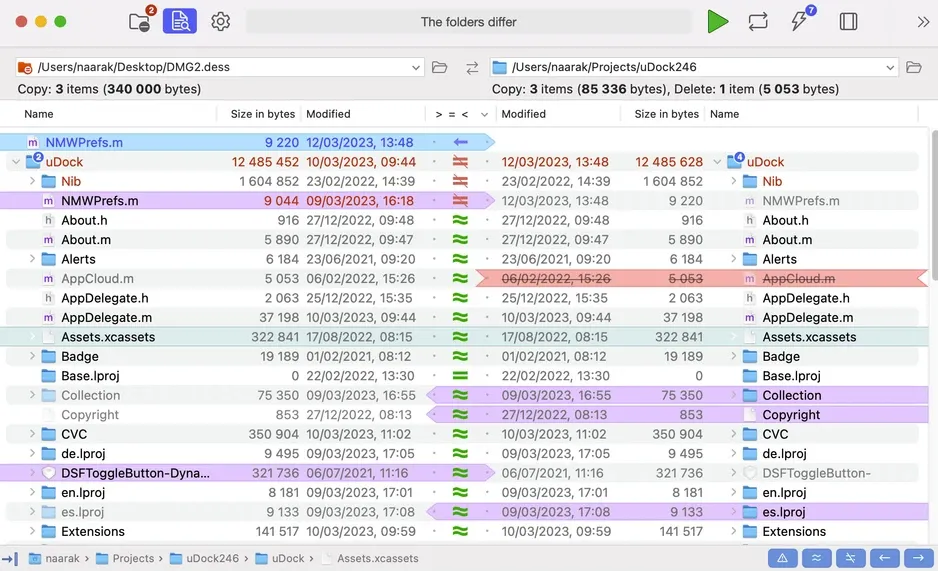
Two folders sit side by side so you can see size, date, and content mismatches before anything is copied.
Drag two folders, then assign arrows
Pick left and right paths from the browse buttons, the comparison history, or by dropping folders from Finder. Press Start. The results view is a pair of expandable trees: identical items stay quiet, differences pick up color and icons for size, date, content, or “only on this side.” Filters at the top hide ignored files, show only mismatches, or isolate orphans. If you need certainty rather than a fast date-and-size pass, turn on Compare file content. DirEqual then reads pairs that already share a name and size, byte by byte, and stops at the first mismatch. That is slower, and it is the point.
Actions stay queued until you assign them. Click the middle-column dot for Copy, hold Shift for Copy As, Option for Delete, or Shift-Command for Copy Tags. Red arrows mean an overwrite. Execute opens a confirmation; you can archive overwritten or deleted items to Trash. Option-click Execute clears the queued actions if you change your mind. Synchronize is a separate pass: Update copies newer and orphan files (one-way or two-way; two-way never deletes, one-way can optionally remove destination orphans). Mirror makes the target match the source and will delete extras. Overview works on the current result; Rescan compares again first.
How do I install and activate?
Run the downloaded image and drag the application to the Applications folder shortcut.
Once the copy is complete, you can launch the application from Launchpad.
Use the SN file for activation.
Compatibility
macOS 10.15 and later