NeoFinder 9.3 for Mac
NeoFinder 9.3 MacOS
A disk cataloger and light DAM that indexes volumes so you can search archives after the drive is unplugged.
Catalog a volume, then unplug it
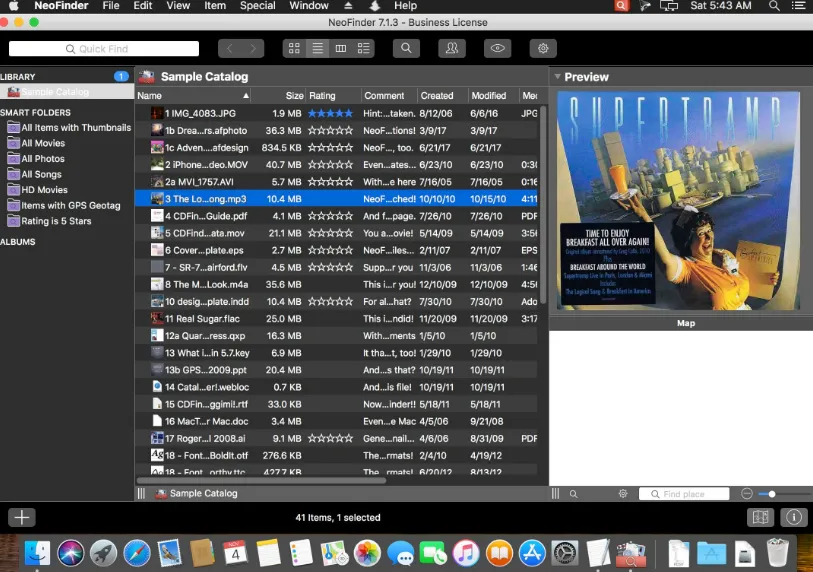
Spotlight only sees mounted volumes. You point NeoFinder at a disk or folder (drag it in, or use Catalog), and it walks the tree. For each item it stores the path, size, dates, and where the format allows thumbnails plus EXIF, IPTC, XMP, ID3, or video codec data. Catalog files live in a database folder under Application Support by default. After the scan you can eject the disk, then search with QuickFind or the Find Editor and Reveal in Finder when you mount the right volume.
That is the core loop for video houses and photo archives that keep most media offline: you browse a local index, not the live filesystem. Spotlight remains available for files that are actually on the Mac, so the two layers sit side by side. Cataloging a NAS volume is allowed on a Private license; putting the database folder itself on a server so several Macs (or abeMeda on Windows) stay in sync is a Business-license feature.
How do I install and activate?
Run the downloaded image and drag the application to the Applications folder shortcut.
Once the copy is complete, you can launch the application from Launchpad.
Compatibility
macOS 10.15 and later