Folder Icons for Mac
Folder Icons for Mac Free Download
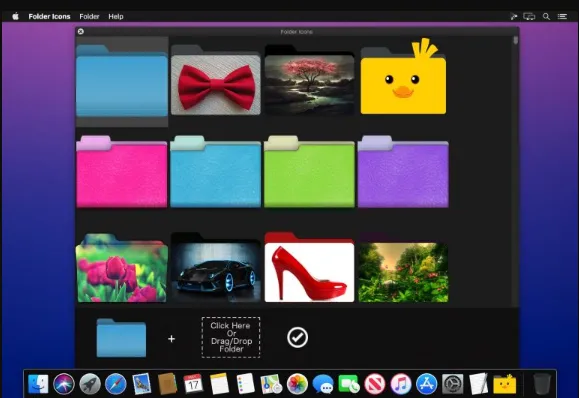
Folder Icons is a handy app that enables you to add cool icons to your files and folders. It features a simple, clean and minimalistic user interface, onto which you easily drag and drop the icons you want to add to your folders. The folder icons bring a great and appealing look to your folders. You have multiple folder template to choose from but you can also used your custom designed folders, be organized, feel happy and be more productive. To change icon simply choose icon, drag the folder you want to change, drop the desired icon and then click on done.
With Folder Icon say goodbye to your old blue boring icon. You have a lot of icons to choose from such as Modern, Classy, Cute, Nature, Office, Music, Pictures and much more. One of the unique feature is that you can add your picture to your folder as icon. It allows you to add icons for your favorite TV Series and movies folders. To sum things up, if you want to add beautiful and cool looking icons to your folders and files you must give Folder Icon a try.
Features
- A handy app for adding cool icons to your folders
- Features an attractive, uncluttered, and intuitive interface.
- Folder icons bring a great and appealing look to your folders.
- Multiple folder template to choose from but you can also used your custom designed folders.
- Change icon simply by choosing the icon, drag the folder you want to change, drop the desired icon and then click on done.
- Choose from different icons such as Modern, Classy, Cute, Nature, Office, Music, Pictures and much more.
- Allows you to add your picture to your folder as icon.
- add icons for your favorite TV Series and movies folders.
Technical Details
- Mac Software Full Name: Folder Icons 2026 for macOS
- Setup App File Name: Folder-Icons-1.4.dmg
- Version: 1.4
- File Extension: DMG
- Full Application Size: 162 MB
- Setup Type: Offline Installer / Full Standalone Setup DMG Package
- Compatibility Architecture: Apple-Intel Architecture