Icon Plus for Mac
Icon Plus for Mac Free Download
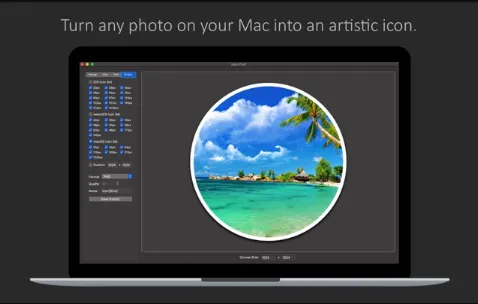
Icon Plus is a powerful and versatile app for converting photos into beautiful icons, combining images and text to create stunning logo designs. It features a clear layout, with flexible adaptive interfaces, allowing huge creativity for app developers and graphic designers. Icon Plus is designed in such a way that you can modify the canvas size, start and end colors of the background gradient, and corner curvature of the background. You can also modify the size and color of the background border. It allows you to control and modify the intensity of the background shadow, offset, color, angle, and blur. Icon Plus enables you to choose between transparent or colored backgrounds.
Icon Plus can help you in making icons allowing you to apply images and text to it. You can apply an image by simply selecting the image and placing in the center of the icon. You can modify the vertical and horizontal offset of the image. Icon plus allows you to modify the color, scale, and rotation of the icon image and offset, color, angle, and blur intensity of the image shadow. For applying text simply enter the text that you want to appear on the logo. Then modify the vertical offset, horizontal offset, color, font type, and font size of the text. You can also modify size and color of the text stroke. Taking everything in consideration, Icon Plus is the perfect app for changing an image into a beautiful icon by combining images and text to create stunning logo designs.
Features
- A handy app for turning any photo into a beautiful icon
- Choose between transparent or colored background.
- Modify the vertical and horizontal offset of the image.
- An export icon in PNG, JPG, TIFF, GIF, or BMP format.
- Simply select the image and place it in the center of the icon.
- Control intensity of the background shadow, offset, color, angle, and blur.
- Apply text by simply entering the text that you want to appear on the logo.
- Change the size and color of the text stroke according to your preference.
- Allows you to change the size and color of the background border of the icon.
- Features a user friendly interface that gives you fast access to all built-in design tools.
- Allows you to create stunning logo designs by converting photos into icons and combining text with it.
- Modify the canvas size, start and end colors of the background gradient, and corner curvature of the background.
Technical Details
- Mac Software Full Name: Icon Plus for macOS
- Setup App File Name: Icon-Plus-1.4.dmg
- Version: 1.4
- File Extension: DMG
- Full Application Size: 4 MB
- Setup Type: Offline Installer / Full Standalone Setup DMG Package
- Compatibility Architecture: Apple-Intel Architecture