Internet Status 5 for Mac
Internet Status 5 for Mac Free Download
Internet Status keeps you informed about your Internet or network connection right from the menu bar. With an icon that indicates the status of the connection and opens to display complete stats including IP address, upload and download speed, etc. Moreover, you can see the connection status, and speed of the network connection and get the public IP address of your computer.
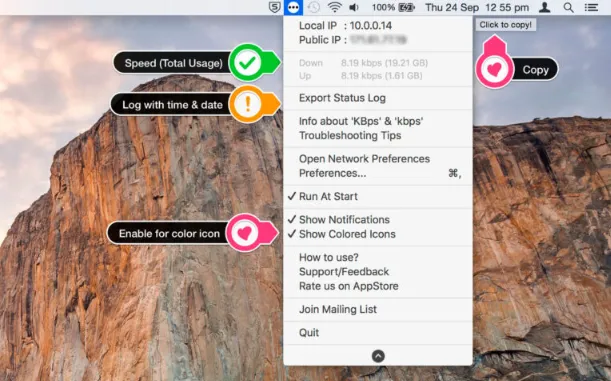
It also provides complete support for Retina-displays providing icons with dark theme support and gives you the option to change icon color from dark to colored. It allows you to copy public IP with a click from the menu and you can see the status of all active interfaces based on the user’s priority. An intuitive user interface is there to make it work according to your needs. Taking everything into account, Internet Status is a highly effective application that keeps you informed about your Internet or network connection right from the menu bar.
Features
- Enable Retina-display enabled icons with dark theme support
- Gives you the option to change the icon color from dark to colored
- Keeps you informed about your Internet or network connection right from the menu bar
- Copy public IP with a click from the menu and you can see the status of all active interfaces
- Icon indicates the status of the connection and opens to display other stats, such as your IP address, etc
- You can see the connection status, and speed of the network connection and get the public IP address of your computer