Folder Size 5.9.0.5
Folder Size 5.9.0.5 Free Download
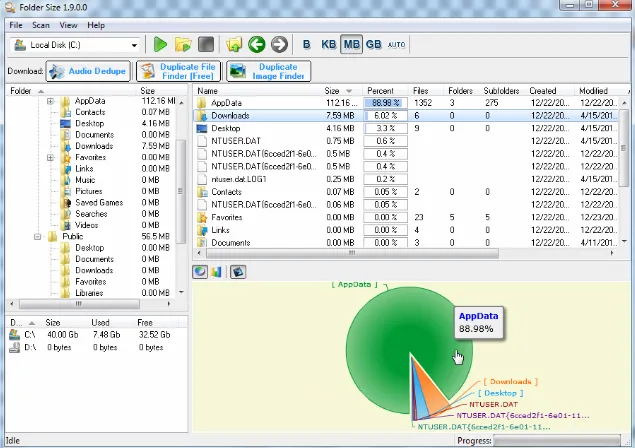
Folder Size will analyze your hard drives and display the file sizes and folder sizes so that you can easily check the distribution of your disk space. The application will display the sizes of the folders and files and also the percentage of the total disk size that they occupy. The neat report can be sorted in order to identify the largest folders and the largest files. You can easily figure out which files or folders have filled up your drive space as Folder Size will also scan the sizes of all the subfolders. The application can scan your entire hard drive in minutes due to its optimized scan algorithms and list details on the tree size and file sizes. The progressive scan will let you continue the scan from the point of interruption.
Besides scanning an entire hard drive Folder Size can also scan a single folder in order to save time. This tool will help you to easily cleanup your disk by listing all the file sizes and folder sizes in a neat report.
Features
Find and display all file sizes and folder sizes.
Scan entire storage device or a chosen folder.
Display the file sizes and folder sizes in different charts – Bar Chart, Pie Chart etc.
Detailed information for all the file sizes and folder sizes listed in table
Name
Folder size or File Size
File size or folder size percentage from the parent folders size
Files count inside the folder
Subfolders count
Creation time
Last modification time
Last access time Folder owner and group
Sort option based on all the different criteria listed above – folder name, folder size, file size etc.
Scan folder using Drag And Drop
Command line option to scan a folder’s tree size -scan “folder path”
“Scan with Folder Size” Windows Explorer context menu
Option to rearrange or hide the columns in the list in order to suit your preferences.
Option to display the file sizes and folder sizes in Bytes, Kilobytes, Megabytes, Gigabytes or automatically determine the most appropriate size format.