Muni Animation MotionMuse 1.1.8
Muni Animation MotionMuse 1.1.8 Download
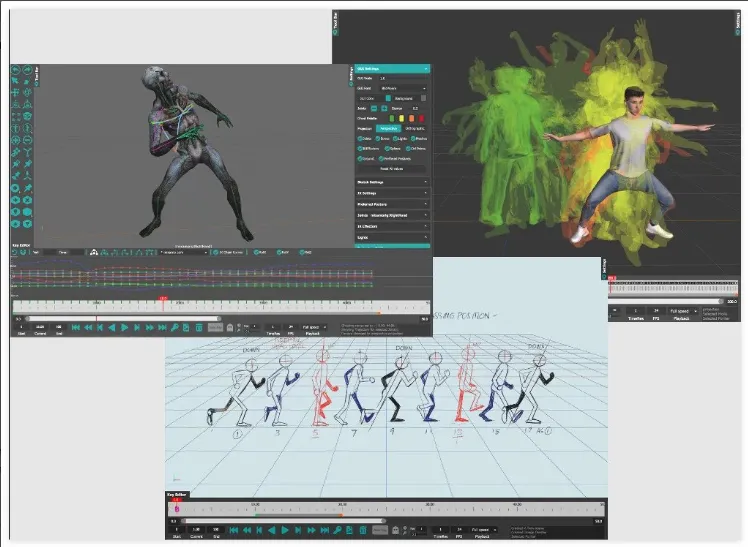
An easy to use toolset for 3D Character Animation. The goal of MotionMuse is to unclutter the Animation process, to bring in new artists to 3D animation without requiring a steep learning curve. To this end we employ powerful tools with an easy to use interface. Anyone, without any knowledge of 3D character animation can pick up MotionMuse and start animating complex characters.
Character Rigging
MotionMuse provides simple and easy to use rigging/skinning tools to quickly bind character to existing or generated skeletons. Simply select the mesh and the skeleton to automatically assign weights for each joint for each vertex. Auto rigging supports rigging of multiple meshes to quickly skin multiple parts of the character. Joint creation tools along with weight painting and bind matrix adjustments further allows our rigging system to quickly set up the character as per your precise requirements.
Retargeting – Animation Transfer
Retargeting in MotionMuse is a simple way to transfer animation across to another character within a few clicks. The character skeletons do not need to be of the same size or even of the same topology for retargeting to work. Simply select the source and target skeletons and MotionMuse will automatically compute a mapping between them. The user can also modify the mapping manually if required. Once satisfied, simply start the animation transfer. The targeted skeleton can then be exported to a new FBX file to be used in the desired workflow.