UniGetUI 2026.1.1
UniGetUI 2026.1.1 for Window
Winget is a package manager that is most likely very familiar to many, but most casual users simply forgo using it due to the command line interface, which may seem daunting to get into. Those who know their way around such interfaces will argue that they’re as simple as they come, but most casual users would still prefer a GUI.
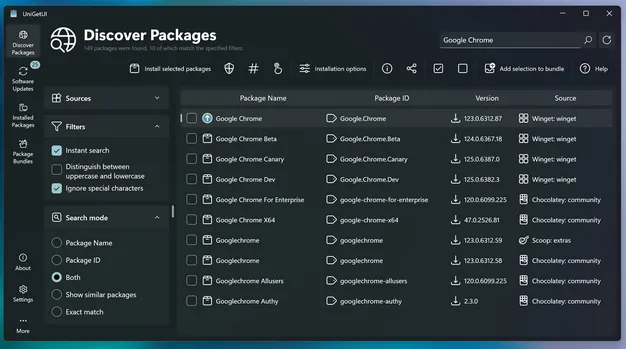
Formerly known as WingetUI, UniGetUI, as its name would suggest, provides a graphical interface for all of your software management needs. Whether it is installing or removing software, or updating existing programs on your computer, this solution supports Winget, Scoop, and Chocolatey as its package managers, meaning that you’ll have a generous catalog of programs to look into.
UniGetUI makes for an efficient way to quickly install numerous programs on your system, and having a GUI makes that process a whole lot easier for all types of users. As far as user interfaces go, this one is decidedly modern and easy to navigate, so it is quite a successful implementation.
Upon first boot-up, you’ll have the ability to choose your preferred package managers. Winget and Chocolatey are automatically selected, but you can also enable Scoop, which is a package manager that contains utilities that serve a more experienced user base.
After all of that, it’s time to look through the software catalog. To say it’s generous would be underselling it: over 10.000 software packages are available across all three package managers, so feel free to look up the programs you need.