CherryTree 1.6.3
CherryTree 1.6.3 Download
CherryTree is designed and delivered as a hierarchical note taking solution that allows you to create, store and organize any number of notes in an easy to navigate structure. When it comes to taking notes there is a huge number of computer programs to choose from. On one side of a performance chart you have simple, basic text editors with a save function, on the other you find more complex tools that are feature-packed, tailored for more advanced users, and at the middle, between proper for novice users and professionals, you have CherryTree.
Practical and easy to use
CherryTree is both simple and complex at the same time. It’s simple because it displays a more than comprehensive user interface which makes it accessible to just about anyone who wants to use it. As far as complex goes, that refers to what’s behind the graphical user interface as the list of what you can do with the application is quite long.
Using this note editor you benefit from an advanced text editor, syntax highlighting, along with table, codebox and image insertion, alignment functions for all types of content, exporting to various formats and much more.
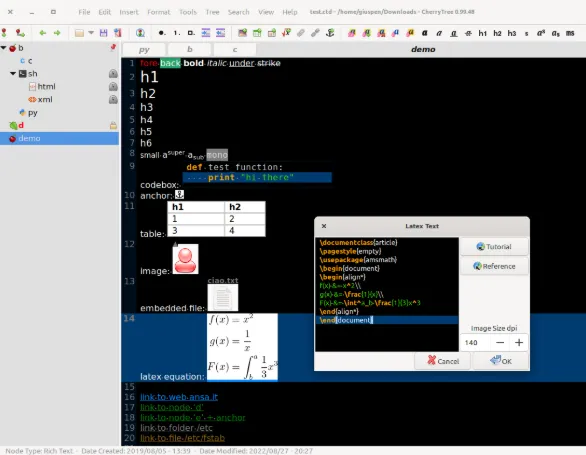
Features
rich text (foreground color, background color, bold, italic, underline, strikethrough, small, h1, h2, h3, subscript, superscript, monospace)
syntax highlighting supporting several programming languages
images handling: insertion in the text, edit (resize/rotate), save as png file
embedded files handling: insertion in the text, save to disk
multi-level lists handling (bulleted, numbered, to-do and switch between them, multiline with shift+enter)
simple tables handling (cells with plain text), cut/copy/paste row, import/export as csv file
codeboxes handling: boxes of plain text (optionally with syntax highlighting) into rich text, import/export as text file
execution of the code for code nodes and codeboxes; the terminal and the command per syntax highlighting is configurable in the preferences dialog
alignment of text, images, tables and codeboxes (left/center/right/fill)
hyperlinks associated to text and images (links to webpages, links to nodes/nodes + anchors, links to files, links to folders)
spell check (using pygtkspellcheck and pyenchant)
intra application copy/paste: supported single images, single codeboxes, single tables and a compound selection of rich text, images, codeboxes and tables