FabFilter Pro-Q 4 v4.01
FabFilter Pro-Q 4 v4.01 macOS
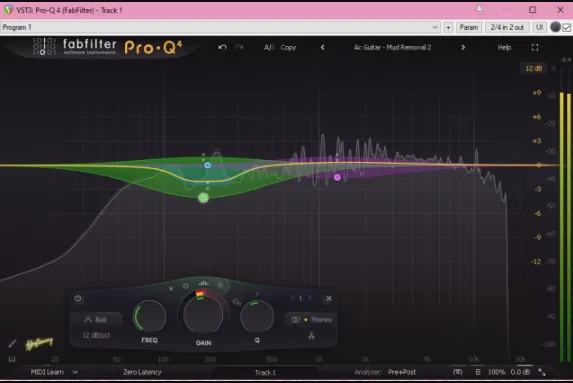
An equalizer is probably the tool you use most while mixing and mastering, so you need the best of the best. FabFilter Pro-Q 4 delivers with the highest possible sound quality, a very extensive feature set, and a gorgeous, innovative interface with unrivalled ease of use.
Pro-Q 4 builds on the powerful feature set, sound quality, and intuitive workflow that have always set Pro-Q apart with the addition of dynamic spectral processing, unified multi-instance control, direct curve drawing, analog-style saturation modes, a fresh new look, and much more.
Spectral Dynamics
Taking problem-solving EQ to new heights, Spectral Dynamics extends Pro-Q’s existing Dynamic EQ mode with the ability to apply expansion or compression to only those frequencies within a specified band that exceed the threshold, leaving all other frequencies unaffected. Making light work of suppressing harshness and unwanted resonances, this form of processing has always required a dedicated plug-in, but Pro-Q 4 simply integrates it as another per-band option alongside the conventional dynamic and static EQ modes users already rely on
. → Key features:
• Professional mastering-grade EQ plug-in with up to 24 bands, a huge range of filter types, 6-96 dB/oct slopes for all filter types, plus Brickwall slopes for the High Cut and Low Cut filters
• New: Draw response curves directly into the display with EQ Sketch
• New: Target problem frequencies with Spectral Dynamics
• New: Control all Pro-Q 4 instances in a session from a single interface with the Instance List
• New: Bring analog-modelled color and warmth to sounds with Character modes
• New: Copy and Paste EQ curves between plug-in instances
• New: Full-featured preset browser, with tags, favorites, search and filter functions, plus new factory presets
• New: Fractional filter slope settings, so, for example, 3 dB/oct Low Cut or 14.2 dB/oct Bell filters can now be created
• New: Apply phase adjustments with the All Pass filter type
• New: Parameter editing directly in the EQ parameter value display via dragging or mouse wheel scrolling
• Improved: Fresh new design, with resizable GPU-accelerated graphical interface and full-screen mode
• Improved: Context-sensitive curve creation previews
• Improved: Attack and Release controls for Dynamic EQ curves
• Improved: Fine-tune Dynamic EQ response with sidechain filtering