
Binary Ninja 6.0.10601
Binary Ninja 6.0.10601 for Mac
Binary Ninja is a software analysis program made by Vector 35. It is used to examine compiled programs when the original source code is not available. The Mac version runs on macOS and can be used to inspect software made for both Intel and Apple Silicon Macs. This makes it relevant to developers and security researchers who work with Mac applications and other native software.
Binary Ninja is different from Xcode. Xcode is used to build applications. Binary Ninja is used to look at applications that have already been built. After opening a supported program, you can inspect its code, functions, text, and the connections between different parts of the program. One of the first things you’ll notice is that Binary Ninja does not simply show a long list of processor instructions. It organizes the program into functions and sections, making it easier to move through the file.
The visual function view is helpful when a piece of code has several possible paths. You can see where a function starts, where it makes a decision, and where each path goes next. This is much easier to follow than reading hundreds of instructions from top to bottom. Binary Ninja can also display code in a more readable form. This helps when you want to understand what a function does without examining every processor instruction individually.
There is an important limitation. The program cannot restore the exact source code used to create an application. During compilation, information such as variable names, comments, and parts of the original structure may be removed. The result shown by Binary Ninja is an interpretation of the compiled program.
Compiler settings can also change what the code looks like. A compiler may combine functions, remove unused code, change the order of operations, or make other changes to improve performance. This can make the program look quite different from the source code that produced it. Binary Ninja also makes it easy to search for text stored inside a program. This can include error messages, website addresses, file names, commands, and other readable information.
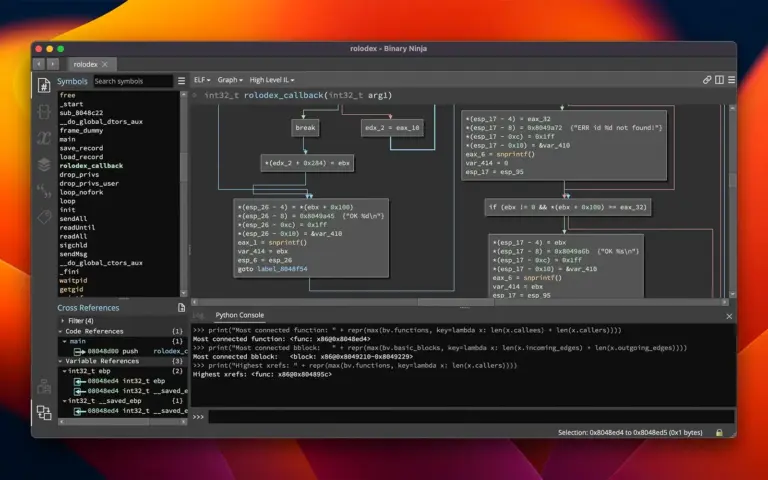
Features
- macOS support: Runs on Mac computers and can be used to examine supported software.
- Apple Silicon: Supports analysis of ARM64 software used by Apple Silicon Macs.
- Intel support: Can analyze x86-64 software made for Intel-based Macs.
- Mac application analysis: Can examine supported native Mac program files.
- Code inspection: Shows the instructions contained in a compiled program.
- Function view: Separates a program into individual functions for easier examination.
- Visual code view: Shows the different paths that code can take.
- Readable code view: Provides a higher-level view of program instructions.
- Text search: Finds readable text stored inside a program.
- Reference search: Shows where a function, string, or other item is used.
- Function analysis: Helps identify functions within a program.
- Multiple views: Lets you examine the same program from different perspectives.
- Scripting: Allows repetitive tasks to be automated.
- Plugins: Supports additional tools and custom features.
- Security research: Can be used to examine software during authorized security testing.
- Software analysis: Helps examine programs when source code is unavailable.
Technical Details
- Software Name: Binary Ninja MacOS
- Software File Name: Binary Ninja 6.0.10601-personal.dmg
- Version: 6.0.10601
- File Size: 584 MB
- File Extension: DMG
- License Type: Premium
- Developer: Vector 360 lnc