Wins 3.6.1
Wins 3.6.1 for Mac
Wins for Mac is a window management app for macOS. It helps you arrange open windows, switch between apps, and keep your desktop organized. If you often work with several apps at once, Wins can make everyday tasks easier.
The app offers more than basic window snapping. It includes tools for switching between open windows, previewing app windows from the Dock, and keeping the Dock on a preferred display. It supports both Apple Silicon and Intel Macs. s 2026 for Mac Review
Wins makes it easier to manage open windows on a Mac. You can move a window to one side of the screen or arrange it in a corner. This is useful when you need to work with two or more apps at the same time. For example, you can place your browser on one side and a writing app on the other. You can also keep a document open while checking information in another app. These actions help reduce the time spent moving and resizing windows.
One useful feature is Snap Island. It gives you another way to arrange windows on your desktop. Wins also supports portrait displays, which can be helpful if you use a vertical monitor for coding, reading, or writing.
Wins includes tools for switching between open windows. Cmd-Tab Plus lets you view and switch between windows more easily. You can use the keyboard to move through the list. You can also close a window or quit an app from the switcher. This can be useful when you have several windows open in the same app.
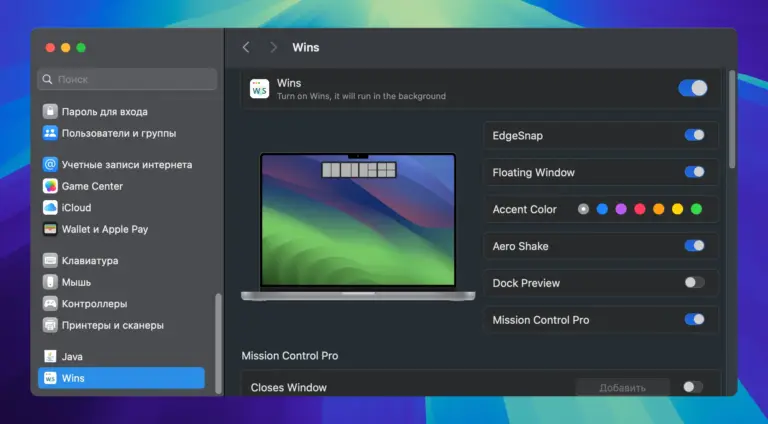
Features
- Window snapping: Move windows to screen edges and corners to arrange them quickly.
- Snap Island: Use another way to organize windows on your desktop.
- Portrait monitor support: Arrange windows when using a vertical display.
- Cmd-Tab Plus: Switch between open windows with keyboard controls.
- Window closing: Close windows or quit apps from the window switcher.
- Dock Preview: Preview an app’s open windows by hovering over its Dock icon.
- Dock Lock: Keep the Dock on your preferred display when supported.
- Mission Control Pro: Manage windows while viewing Mission Control or App Exposé.
- Hide other windows: Clear distractions by hiding other open windows.
- Hide all windows: Hide open windows when you need a cleaner desktop.
- Move windows between displays: Send windows to another connected screen.
- Keyboard shortcuts: Set shortcuts for supported actions.
- Apple Silicon support: Run Wins on compatible Macs with Apple Silicon.
- Intel Mac support: Use the app on supported Intel-based Macs.
Technical Details
- Software Name: Wins MacOS
- Software File Name: Wins 3.6.1.dmg
- Version: 3.6.1
- File Size: 60 MB
- File Extension: DMG
- License Type: Premium
- Developer: Win