Folder Icon Maker 2
Folder Icon Maker 2 for Mac
If your Desktop is full of folders that all look the same, you know the problem. You open one folder after another just to find the right one. This wastes time every single day. Folder Icon Maker fixes this problem in a very direct way.
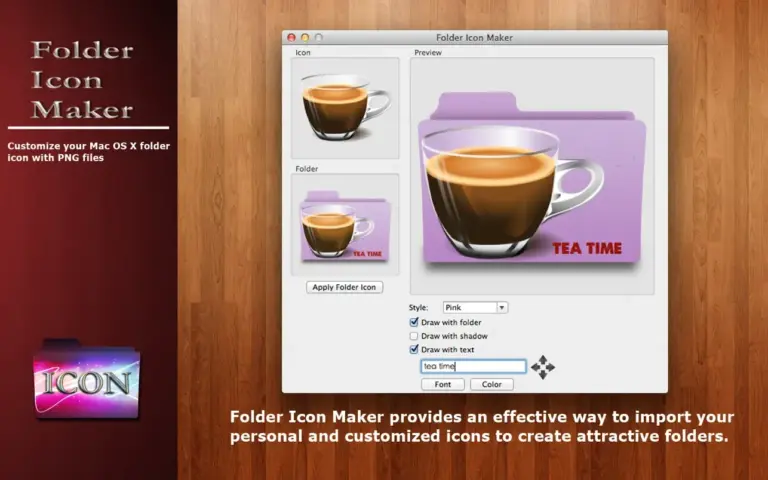
The app works with a simple drag and drop system. You drop a PNG image into the app window. The app turns that image into a folder icon right away. Then you drag your folder into the same window and the new icon gets applied instantly. There is no menu to search through and no settings to figure out. This makes the app a good fit for anyone who wants results fast, not a learning curve.
You can also add text to any icon. This is useful if you want to label folders by name, date, or project without opening them. On top of that, the app lets you drag an existing app icon into the tool, so you can reuse icons you already like instead of hunting for new images online.
Folder Icon Maker also gives you four color styles to choose from. This means you are not stuck with the same look for every folder. You can pick a style that matches your desktop theme or use different styles to separate work folders from personal ones.
Features
- Drag and drop PNG images to create custom folder icons
- Drag and drop folders to apply new icons instantly
- Add custom text directly on top of folder icons
- Drag existing app icons into the tool for reuse
- Four different color styles for folder icons
- Two customization options for different icon effects
- Resize and reposition icons using scroll or trackpad
- Fast two step workflow with no complex settings
- Works fully offline once installed
- Lightweight app with a simple, clean interface
Technical Details
- Software Name: Folder Icon Maker
- Software File Name: Folder Icon Maker 2.0.dmg
- Version:2.0
- File Size: 5 MB
- File Extension: DMG
- License Type: Premium